

Looking for a way to break the digital ties between your Instagram and Facebook accounts? Whether it’s for privacy reasons or a change in social media strategy, the process of unlinking these two platforms is straightforward. In this guide, we’ll walk you through the steps to disentangle your Instagram account from Facebook and vice versa. So, follow along as we explore the process of how to unlink Instagram from Facebook.
Ready now? Let’s get started.
How to Unlink Instagram from Facebook?
If you’re considering unlinking these two platforms, there are essentially two ways to go about it: one from Instagram and the other from Facebook.
Here’s how to disconnect Facebook from Instagram through Instagram platform:
1. Log in to Instagram: Begin by logging in to the Instagram account that is currently linked to your Facebook account.
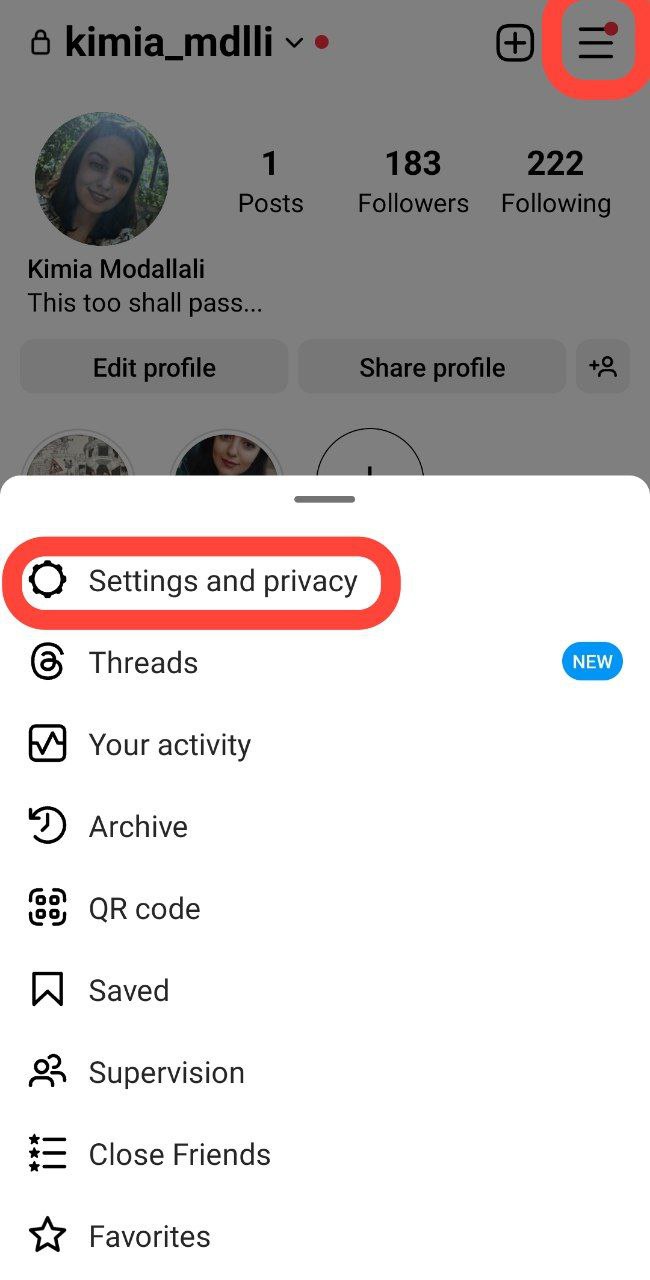
2. Navigate to Settings and Privacy: Once logged in, access your profile and tap the hamburger menu located at the top right of the screen. From the dropdown menu, select ‘Settings and Privacy.’
3. Access Accounts Center: Within the settings, look for the ‘Accounts Center’ option. Note that the location of ‘Accounts Center’ option may vary slightly depending on your Instagram version.

4. Select Accounts: Under ‘Accounts Center,’ tap on ‘Accounts.’ Here, you will find the Facebook account linked to your Instagram.

5. Initiate Unlinking: Locate the linked Facebook account and tap ‘Remove.’

6. Confirm Your Decision: Select ‘Remove account.’

7. Confirmation Steps: Follow the prompts by tapping ‘Continue.’

8. Final Step: Confirm the unlinking process with a final ‘Yes, remove…’

Also read: How to Link Instagram to Your Facebook Page?
Unlinking Through Facebook
Now, if you’re aiming to unlink Instagram and Facebook, you’ll need to follow a different procedure. Here’s how to unsync Facebook and Instagram within the Facebook platform:
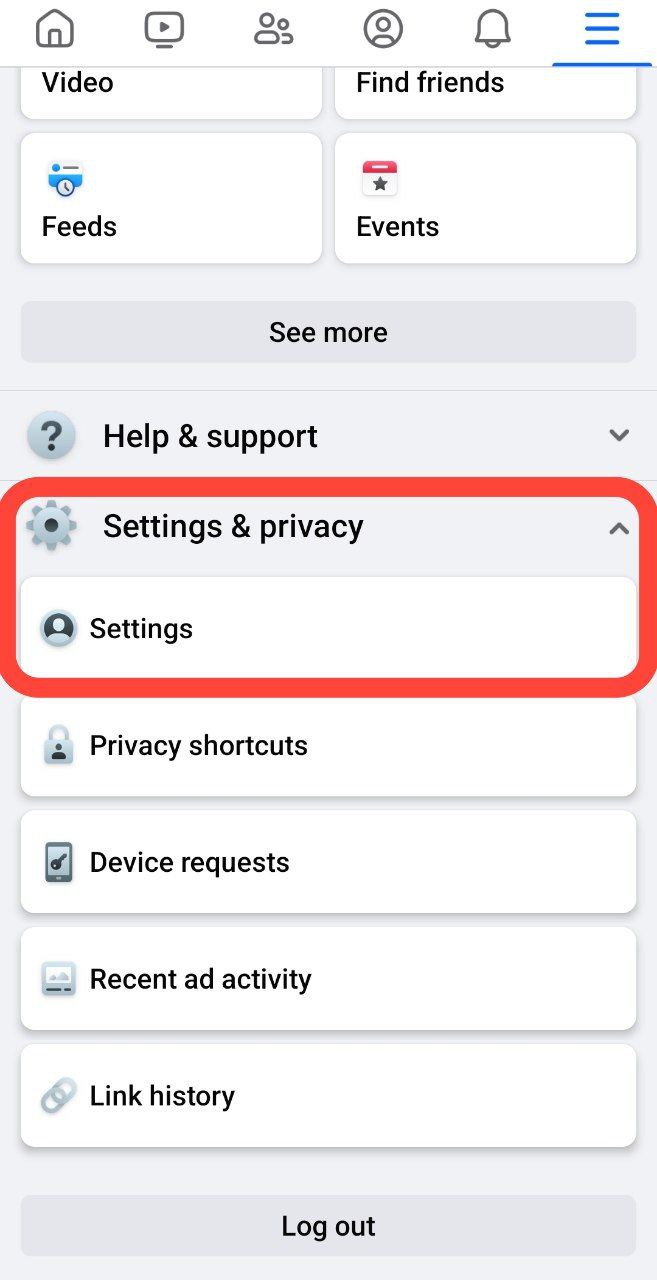
1. Log in to Facebook: Access your Facebook account through the linked Instagram profile. On the Facebook homepage, tap the hamburger menu at the top right of the screen.

2. Navigate to Account Settings: Scroll down and find ‘Settings and Privacy,’ then further navigate to ‘Settings.’
3. Access Accounts Center: In the ‘Settings’ section, tap ‘Accounts Center,’ mirroring the steps taken on Instagram.

4. Select Accounts: Under ‘Accounts Center,’ tap ‘Accounts,’ similar to the Instagram procedure.
5. Initiate Unlinking: Locate the linked Instagram account and tap ‘Remove.’ Confirm your decision by selecting ‘Remove account.’
6. Confirmation Steps: Follow the prompts by tapping ‘Continue’ and then confirming the unlinking process with a final ‘Yes, remove…’
Wrap Up
Being in control of your online presence is pretty handy, right? Knowing how to disconnect Facebook from Instagram is like having an extra tool in your digital toolbox.
So, following the steps we’ve provided in this blog puts you in the driver’s seat of your social media connections.
Remember, you can always link your accounts back together if you change your mind.
The freedom to customize your connections is yours. Thus, enjoy managing your social media without any strings attached! 🙂
FAQs
Now that you know how to unsync Facebook and Instagram, it’s time for some frequently asked questions.
1. What Happens If I Unlink My Instagram from Facebook?
Unlinking your Instagram from Facebook means:
1. No Automatic Sharing: Your Instagram posts won’t automatically appear on your Facebook timeline.
2. Separate Logins: You can still log in to Instagram without Facebook, but the direct connection is severed.
3. Profile Disconnect: Mutual followers won’t see your Instagram activity on Facebook, and vice versa.
4. App Permissions: Any permissions or data syncing between the two platforms will be cut.
5. Ads and Insights: Integration for ads and analytics between Instagram and Facebook may be affected.
Remember, you can always reconnect them if you change your mind.
2. Will My Instagram Posts Still Appear on Facebook after Unlinking?
No, unlinking stops the automatic sharing of Instagram posts on Facebook. You’ll need to manually share content if you want it to appear on both platforms.
3. Can I Still Log in to Instagram Using My Facebook Credentials after Unlinking?
Yes, unlinking won’t affect your ability to log in using Facebook credentials. However, the direct sharing options will no longer be available.
