


Instagram, with more than one billion active users in a month, is one of the most popular social media platforms globally. As its popularity is growing, Instagram is adding more tools and features to make this platform safe and better for its users. One of the best features added to this platform during the past years is the close friends Instagram tool. In this article, we will show you everything you need to know about close friends Instagram meaning and how to use it professionally.
What Is The Instagram Close Friends Feature?
The close Friend feature on Instagram allows you to customize and create a private list of users that can view your Stories. This private list only works for Instagram stories of all kinds, photos, videos, and reels. Even though it doesn’t work for feed posts, you can limit users’ access to your posts using the block and restrict options. Also, you can switch from a public account to a private one. There is no limit on the number of users you can add to this list and you can add as many friends as you want.
Understanding Close Friends on Instagram
Now let’s see how the close friends feature works before using it. Similar to normal Stories, Stories with close friends will disappear after 24 hours unless you highlight them on your profile. Users on your close friend list will know that they are added and can see a green label around the story. Users who are not on the list will not understand and can’t request to be in that.
You can also share reel videos with your close friends list and if someone on the list interacts with your video, others can see it.
How to Use Instagram Close Friends?
If you only want to communicate with certain people or a specific group of users, close friends Instagram post is a perfect solution. This way you can share private photos and videos with users who you give them access.
How to Set Up Your Instagram Close Friends List?
Instagram doesn’t choose who’s gonna be on your close friend list; You have to add or remove them manually. Now that you know everything about close friends on Instagram, Here is how to set up your list and start sharing your content.
- Open the Instagram app and go to your feed page.
- Tap on the “Your Story” option on the left corner of your screen.
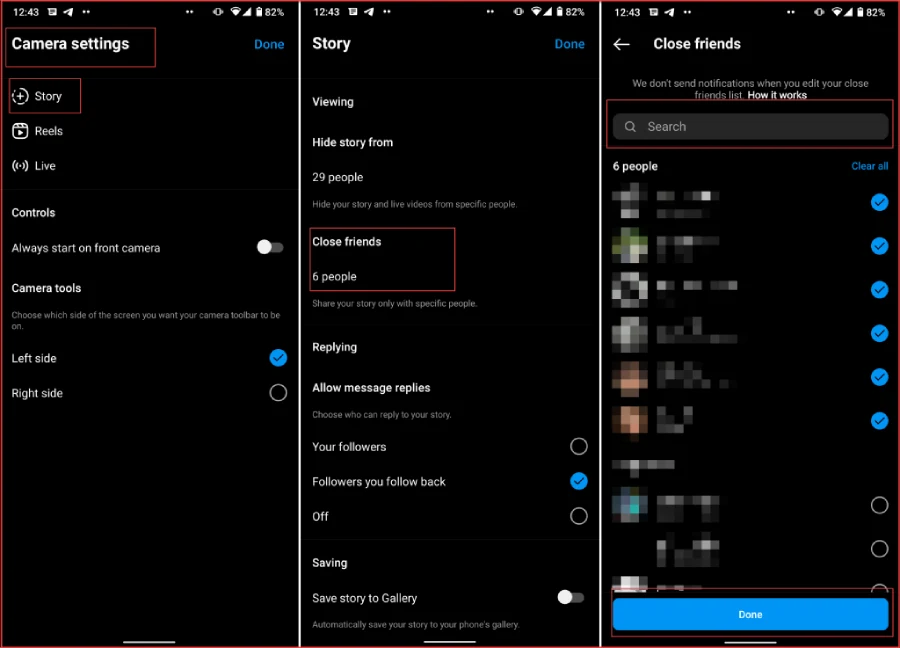
- Open your camera settings from the upper right corner and select “Story.”
- Select “Close friends.”
- Search and add the ones you want to be in your list and select “Done.”
Four unique ways to use Instagram Close Friends
If you think the close friends story feature is only for personal use, you are totally wrong. Here are some tips and tricks to use this feature for your business.
Offer Discount Codes
If you are using Instagram to grow your brand and business, you can use the close friends Instagram feature professionally to contact your audience. One of the best practices to increase your customers’ loyalty and increase your sales is by offering them discount codes and freebies. Create a list of customers who have purchased a lot from you in the last month and add them to your close friends list.
Collect Customers’ Feedback
If you want to run your next Instagram campaign or have just finished one, close friends Instagram 2022 is a great way to engage with your audience and gather valuable information about your performance. Use Q&A stickers to collect messages from your most engaged users to find out what content they find most interesting and valuable posts.
Also, you can ask them about the topic they want you to cover in your next posts.
Contact Brands And Influencers
Almost all brands and influencers try working with influencers and similar brands to promote their service and attract potential followers. You can use close friends Instagram posts to contact your campaign leaders and analyze your performance together.
Share Customers-Only Content
If you have a coaching business or you are offering a consulting service on Instagram, you can use the close friends Instagram story feature to share tips and advice with your paying and loyal customers. You can also share behind-the-scenes videos, small tips, product recommendations, etc.
This type of content is a great way to show your current customers that you care about them and make them feel special.
Instagram Launches New Close Friends List For Instagram Stories
After launching the close friend feature in 2018, Instagram has changed its place and the way to access it many times to find the best way for users. In the last update, its name was changed to “Selected Users” but in the new update, they changed it back to close friends. But the way to access is much easier! All you need to do is to open your stories and you can see the close friend button.
Instagram’s Close Friends Features Essential For My Mental Health
For those who have a public account on Instagram, there are times you feel angry or sad about the comments they receive from unknown users. Restricting and blocking them is a simple and effective way to limit access to your content. But other than that, you can share your private content carefully with a group of people that you trust and feel safe with. Using this close friends Instagram story hack, other people will not figure out that they are not on the list.
How To Upload A Story To Instagram Close Friends
Sharing stories with your close friends on Instagram is similar to sharing stories normally. In the last part, we showed you how to add close friends on Instagram and design your list. Now follow these simple steps to share your story:
- Log into your Instagram account and go to your feed page.
- Scroll your screen to the left to open your Stories. You can also tap the “+” button at the top left corner.
- Open your gallery and select a photo/video/reels or capture one.
- Tap “Next.”
- Add your filters, stickers, music, etc.
- Tap “Share to close friends.”
How Can You Use The Close Friends List On Instagram Stories For Your Business?
close friend feature is perfect for individuals who want to share private photos and videos with their friends and family. But this feature is not only for personal uses; Brands and businesses can use this feature too professionally. In the last parts, we showed you how to customize your Instagram close friends list for your business and grow your page. So don’t forget to try this feature if you want to grow your customers.,
Conclusion
Nowadays Instagram with more than one billion active users in a month is not only for sharing photos and videos. Thousands of brands and businesses use this platform to grow their audience and get more customers. That’s why Instagram is adding more tools and features to make this platform better for everyone. One of the best features added to this platform is the close friends Instagram feature. In this article, we told you everything you need to know about this tool; Also, how to use it professionally for your business.
Want to share a private photo or video with your friends and family? Here is how to use close friends Instagram feature:
1. Log into your Instagram account and go to your feed page.
2. Tap on the story option at the upper left corner of your screen.
3. Upload your content from the gallery or capture one using your camera and tap “Next.”
4. Add your filters, hashtags, stickers, etc. When you are done, tap “Share to close friends.”
Want to create your close friend list on Instagram to share private photos and videos? Follow these steps:
1. Log into your Instagram account and go to your feed page.
2. Open your Stories by tapping the “Your Story” option at the top left corner.
3. Open the camera settings and select “Story.”
4. Choose “Close Friends.”
5. Search and add the ones you want to be on your list and select “Done”.
You can share photos, videos, and reels with users that you’ve added to your friend list. But to message them on your DMs, you need to create a group chat and add them.
If you want to share a Story with only a few people, first you need to add them to your close friend list. After that, share the story as you normally do, but instead of tapping “Share”, select “Share to close friends”.
