


You open your Instagram message box and get flooded by text bubbles? Say hello to Instagram notes.
Notes are one of the most popular Instagram features that stepped into the platform in December 2022. They’re more than simple texts and can build stronger connections or create more engagement for brands and individuals.
This blog is your complete guide to Instagram Notes. Let’s dive in and learn how to make them!
What Are Instagram Notes?
Instagram Notes are short texts appearing on the top of your DM inbox and profile picture. You can share your thoughts through notes with your followers (who you follow back) and close friends.
Instagram notes should be 60 characters long. They will disappear after 24 hours, just like stories.
Besides, Instagram has recently added video notes and songs so you can combine short videos with texts. In addition, your followers can reply to your notes with texts, emojis, stickers, or voice.

Instagram Notes
Instagram Notes: Key Takeaways
- ‘Instagram Note’ is located at the top of your messages.
- Notes are available for both personal and business accounts on the app and desktop.
- You can share your notes with followers you follow back and close friends.
- The maximum limit for IG notes is 60 characters long.
- Notes on Instagram will disappear after 24 hours.
- You can attach videos and songs to your text notes. Note: This feature might not be available in all regions.
- Your followers can reply to the notes with texts, emojis, stickers, and voice.
Suggested Post: Why Does My Instagram Not Have Notes
How to Get Notes on Instagram?
If you’re wondering how to get Instagram notes on the app and PC, just follow these steps:
- Open Instagram and tap the airplane icon at the top right corner.
- You’ll find a text bubble above your messages.

How to Get the Notes on Instagram
Another way to get Instagram notes is by going to your profile and tapping the text bubble on top of your profile picture.
Suggested Post: How to Unmute Notes on Instagram
How to Add Notes on Instagram?
Want to create a note and share it with your friends? Here are a few simple steps:
- Open the app and go to your message inbox.
- Tap the text bubble on top of the messages.
- Write your text and add emojis.
- Now, tap the ‘Share’ at the top right corner and choose who you want to share your note with.
- Finally, press Share to publish the note.

How to Create IG Notes
How to Create Video Notes on Instagram?
Creating a video note is just as easy as making text notes. Just do as follows:
- Tap the camera icon in the text bubble.
- Next, click the blue circle to catch the video.
- Add your text note, choose your audience, and tap share.

Steps to Creating Video Notes on Instagram
How to Delete an Instagram Note?
You may change your mind and want to delete your note or replace it with a newer one. To delete your note, tap the note you shared and select either ‘Leave a New Note’ or ‘Delete Note’.

Deleting an Instagram Note
How to Reply to Instagram Notes?
One great feature of Insta notes is that you can like them or reply to them with text, emojis, and stickers.
This allows a conversation to be generated around the note that only you and the person who replied can see. To like or reply to a note, you need to do the following:
- Open the note and type your message. You can respond to notes using emojis and stickers. To like the note, tap the heart icon.

Replying to an Instagram Note
How to Mute Instagram Notes?
Fortunately, you can control which notes you see! Instagram lets you mute notes from specific followers, just like stories. Here’s how to do it:
- Open the app and go to the profile of the person you want to mute their notes.
- Click ‘Following’ and choose ‘Mute’ from the list.
- To mute notes, simply toggle the ‘Notes’ option to the Off position.
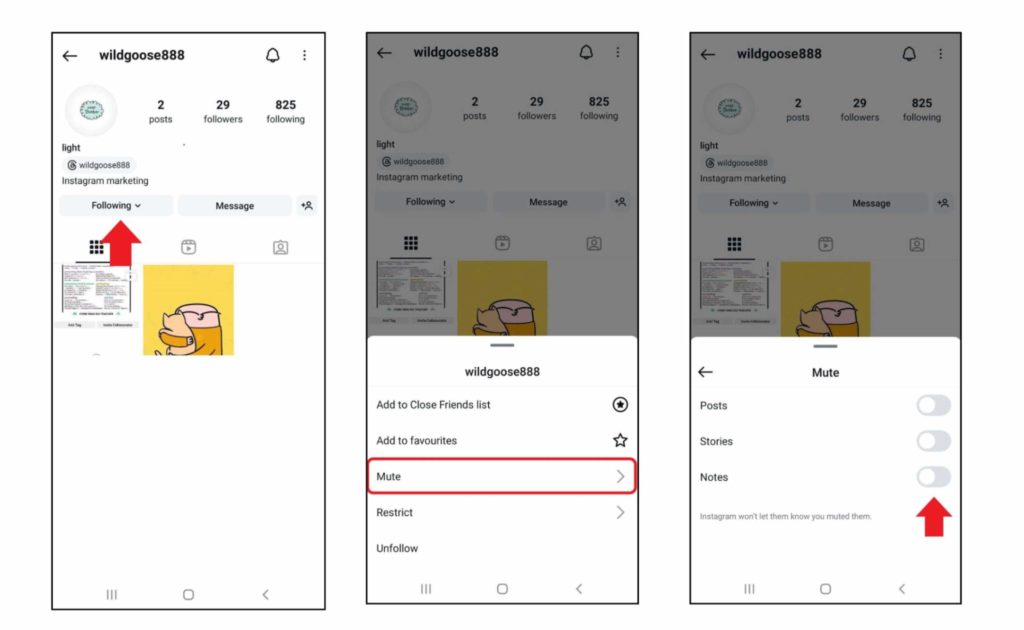
Muting Notes on IG
What Are the Benefits of Instagram Notes?
It’s crystal clear that IG notes offer great opportunities to connect with your followers. But the benefits aren’t only for personal accounts. Brands and businesses can also take advantage.
- Brands can share updates and short bursts of exciting news in their notes. No need to spend time designing something special.
- With the new prompts and perhaps the future updates, it’s easier to spark conversations around a topic. This way, you’ll get more engagement and brand awareness.
- Since you can filter your audience, it helps you engage with your loyal customers at a higher level.
- Last but not least, it’s a great way to interact with your followers. We’re talking about asking questions or running polls.
Note: Add some personal touch to your notes. You don’t have to be serious! Feel free to use emojis and CTAs.
FAQs
Have more questions about IG notes? You may find your answers here:
1. Who Can See My Notes on Instagram?
Only your followers who you follow back can view your notes.
2. Can I See Who Viewed My Notes on Instagram?
No, currently it’s not possible to see who viewed your notes on Instagram.
3. Will People Get Notified When I Share a Note on Instagram?
No, Instagram doesn’t send notifications when you share or delete a note.
4. Where Can I See Replies to My Notes?
Replies to your IG notes will appear in your DM inbox.
Wrapping up
Now you know all about Instagram Notes! You can create short messages, share them with friends, and even hide notes you don’t want to see. With new features coming soon, Notes are getting even better. The key is to use them to connect with your followers and keep them interested!
