


Instagram is a powerful platform for sharing and discovering creative and visually stunning content. While the platform is an excellent tool for capturing and sharing photos and videos, the locations we choose to shoot can make all the difference.
Whether you’re looking to add variety to your feed, showcase a new place, or find a fresh perspective on a familiar spot, countless Instagram location ideas can help you take your content to the next level. This article will explore some of the most innovative and must-try Instagram location ideas to help you elevate your feed and create stunning and engaging content.
Why You Need To Use Instagram Location Tags?
Instagram location tags are useful for several reasons:
- Discovery: When you add a location tag to your post, your content becomes discoverable to people searching for posts from that location. This can increase your post’s visibility and reach a wider audience.
- Engagement: Using location tags can also increase engagement on your posts. People familiar with or interested in the location are more likely to engage with your post and leave comments.
- Community building: Using location tags, you can connect with other people in the same location and build a community around your content.
- Branding: If you’re a business, using location tags can help you establish your brand in a specific location and attract local customers.
Overall, using Instagram location is a simple but effective way to increase the platform’s visibility, engagement, and community.
Also read: Instagram Live Ideas
How To Add Location Tag To Your content?
A location map is a powerful tool for businesses, influencers, and individuals who want to gain more visibility and engagement on their posts. By adding locations to your pots, you will appear on the Instagram location map, and nearby people can discover your content quickly.
Add Locations To Instagram Posts
To add a location to your Instagram posts, follow these steps:
- Open the Instagram app on your mobile device.
- Tap on the “+” icon at the bottom of the screen to create a new post.
- Select the photo or video you want to post from your gallery.
- Tap “Next” in the top right corner.
- Tap “Add Location” at the bottom of the screen.
- Type in the name of the location you want to add or select it from the list of suggested locations.
- Tap “Done” to save the location.
- Add any captions, tags, or other features you want for your post.
- Tap “Share” to publish your post with the added location.

Note: Make sure your device’s location services are turned on and that Instagram has permission to access your location.
Add Location To Instagram Stories
Like posts, location tags on your stories can make your content visible to more users. To use Instagram location stories, follow these steps:
- Open the Instagram app and swipe right from your home feed to access the camera screen.
- Take a photo/video or choose one from your camera roll.
- Tap the sticker icon located at the top of the screen. It’s square with a smiley face on it.
- Scroll down to the “Location” sticker and tap on it.
- Instagram will automatically detect your current location, but you can use the Instagram location search at the top of the screen.
- Once you’ve found the location you want to add, tap on it. You can then resize and reposition the sticker by using your fingers.
- Tap the “Send to” button at the bottom of the screen to share your Story.
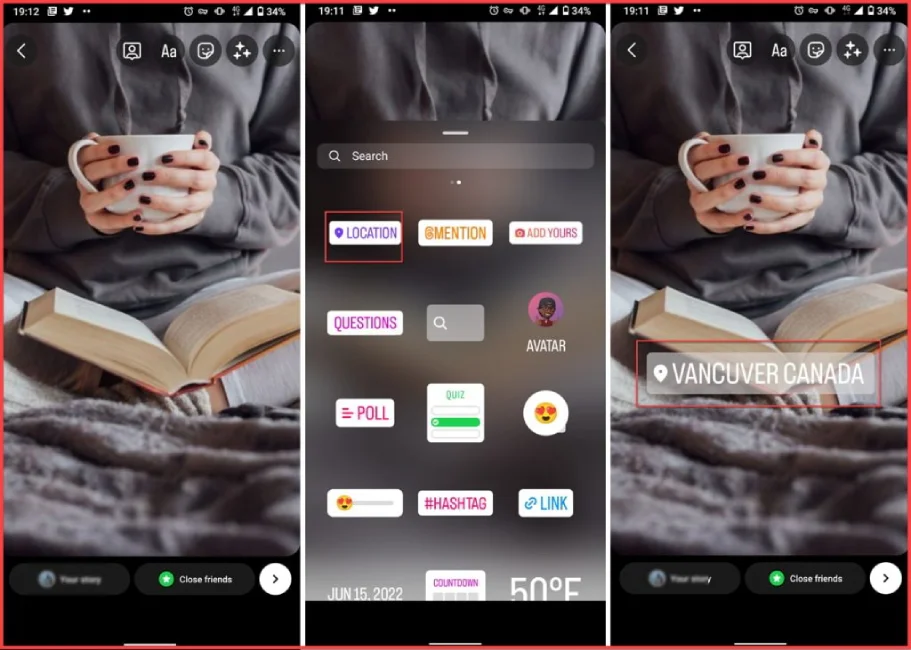
That’s it! Your Story will now show the location sticker you added.
How To Create An Instagram Location?
If your business and company’s location needs to be submitted on the Instagram map, don’t worry. We will show you how to make an Instagram location with simple steps.
- First, you need a business Facebook account connected to your Instagram page.
- Log into your Facebook page and tap “Create a post.”
- Below the uploading section, tap the “Check in” button.
- In the opened search bar, type down the location name and search.
- Tap “Add” on the bottom of your screen to create your custom location.
- Save the location and switch to the Instagram app. Now you can add the location to your posts and stories as you always did.
How To Change Instagram Location?
To change your Location on Instagram, you can follow these steps:
- Open the Instagram app on your mobile device.
- Go to your profile by tapping your picture at the bottom right corner.
- Tap on the three horizontal lines at the top right corner of your profile.
- Scroll down and tap on “Settings.”
- Tap on “Privacy.”
- Tap on “Location” under the “Connections” section.
- Toggle on “Location Services” if it’s not already on.
- Tap on “Instagram” under the “ALLOWED APPS” section.
- Tap on “While Using the App” to give Instagram access to your location while you’re using the app.
- You can also customize the location settings for Instagram by tapping on “Location” under the “ALLOWED APPS” section and then choosing “Precise Location” or “Approximate Location.”
Once you’ve given Instagram access to your location, you can add or change your location by creating or editing a post or story and tapping on the “Add Location” option. You can search for a specific location or choose from the suggested locations. You can also remove your location from a post or story by tapping on the location and selecting “Remove location.
How To Turn Off Instagram Location?
You can turn off location services by following these steps to access your Instagram location settings:
- Open the Instagram app on your device and go to your profile page.
- Tap on the three horizontal lines in the top right corner of the screen.
- Scroll down and tap “Settings” at the bottom of the list.
- From the “Settings” menu, tap on “Privacy” and then “Location.”
- Toggle off the “Location” option to disable location services for Instagram.
Once you turn off location services, Instagram cannot access your device’s location information and will not add location data to your posts, stories, or other content. If you want to enable location services again in the future, you can follow the same steps and toggle the “Location” option back on.
Read more: How to add location on Instagram?
Instagram Location Ideas
There are plenty of options if you’re looking for Instagram location ideas. Whether you’re an urban explorer, nature lover, or culture enthusiast, there’s a location perfect for your Instagram feed. This part will show you some cool Instagram location tags and ideas.
Cool Instagram Location Tags
If you’re looking for some cool Instagram location tags to spice up your posts, here are a few ideas:
- Rooftop Bars: Showcase your love for nightlife and stunning cityscapes with a rooftop bar location tag.
- Street Art: Tag the location of colorful street art murals for a unique and eye-catching Instagram post.
- Vintage Shops: Show off your retro style by tagging the location of an excellent vintage shop.
- Secret Spots: Share your favorite hidden gems and secret spots in your city with a location tag off the beaten path.
- Foodie Hotspots: Tag the location of your favorite restaurants, cafes, and food trucks to share your love of good eats with your followers.
- Live Music Venues: If you love catching live music shows, it’s a perfect Instagram location ideas to tag the location of your favorite concert venues.
- Local Landmarks: Celebrate the history and culture of your city by tagging local landmarks and monuments.
- Graffiti Walls: One of the best Instagram location ideas is adding some urban edge to your Instagram feed by tagging the location of a graffiti wall.
- Bookstores: Show off your love of literature and cozy reading nooks by tagging the location of your favorite bookstore.
- Beachside Cafes: If you live near the coast, tag the location of a beachside cafe or restaurant for a relaxing and beachy vibe.
Funny Instagram Location Ideas
Here are some funny Instagram location ideas that you can use for your posts:
- My Bed – because, let’s face it, that’s where we spend most of our time.
- The Land of Procrastination – for when you’re putting off your responsibilities.
- The Bottomless Pit – for when you’re eating way too much food.
- The Pile of Laundry – for when you’re finally tackling that mountain of clothes.
- The Fortress of Solitude – for when you need some alone time.
- The Office of Memes – for all the meme lovers out there.
- The Upside Down – for fans of Stranger Things.
- Narnia – for when you need an escape from reality.
- The Couch Potato’s Lair – for those who love to binge-watch TV shows.
- The Island of Misfit Toys – for when you’re feeling quirky.
Remember to be creative and have fun with your Instagram location ideas!
Conclusion
In conclusion, Instagram location ideas can be fun to add humor and personality to your posts. Using creative and funny location names, you can showcase your sense of humor and add a unique twist to your content. Whether sharing a selfie from your bed or adding a location tag to your latest foodie adventure, Instagram location ideas can help you stand out and make your followers smile. So, the next time you post on Instagram, consider using a funny location tag to make your post even more memorable!
FAQs:
What Location On Instagram Gets The Most Likes?
There isn’t a specific location on Instagram that consistently gets the most likes, as it ultimately depends on the content of the post, the audience, and the current trends. However, some popular locations on Instagram that tend to get a lot of likes include:
- Iconic landmarks such as the Eiffel Tower
- Beautiful natural landscapes like beaches, mountains, etc.
- Popular tourist destinations
- Luxurious hotels or resorts,
- Celebrity hotspots, such as restaurants or clubs.
Is It Good To Tag the Location On Instagram?
Adding locations to your Instagram posts can provide several benefits, such as reaching a wider audience, connecting to the local audience, increasing your engagement, and enhancing authenticity.
What Are Instagram Location Tags?
Instagram location tags are a social media platform feature allowing users to add a specific location to their posts. This location can be a city, landmark, restaurant, or any other place previously added to Instagram’s database of locations.
Location tags can be added to photos and videos on Instagram and selected from a list of suggested locations or manually added by typing in the name of the location.
