


Ever felt the need to pause before clicking “post” on your freshly created content? Well, Instagram drafts-these seemingly ordinary drafts, offer you the precious moment to rethink. But they’re much more and you can use them to your advantage. Let’s dive into this blog to find out how.
What are Instagram saved drafts?
Are you new to Instagram drafts? Let’s explore what they are and their benefits. If you’re familiar with drafts, feel free to skip ahead.
Instagram draft is a feature within the app allowing you to save and edit your posts before immediately sharing them. Whether it’s a photo, caption, or reel, you can work on perfecting your content and then publish it.
Any benefits to Instagram drafts?
Using Instagram drafts in marketing offers several benefits:
- You can plan your content ahead of time and create a post as you’d like.
- When you prepare multiple posts in advance, you can maintain a consistent posting schedule.
- Since you have enough time to edit and perfect your captions, hashtags, and more, you’ll get more efficiency.
- In addition, using drafts can save you time during busy periods, allowing you to quickly finalize and share posts.
- By saving drafts, you can capture your creative ideas quickly, making sure not to skip your mind.
- Another advantage is effective time management, especially during busy periods.
How to use drafts on Instagram?
Now that you’re in the loop about all the great things an Instagram draft can do, let’s find out how to make the most of it.
#1. Create a draft
Creating a draft is much easier than you think. You just need to start making a post as you normally would, add a photo, edit it, write a caption, and include any desired hashtags or location tags.
How To Save A Draft On Instagram [Post]
When creating a draft on Instagram using the app, you can also include Boomerang videos in your post, making it a Boomerang draft Instagram. Here’s how to make an Instagram draft using the app:
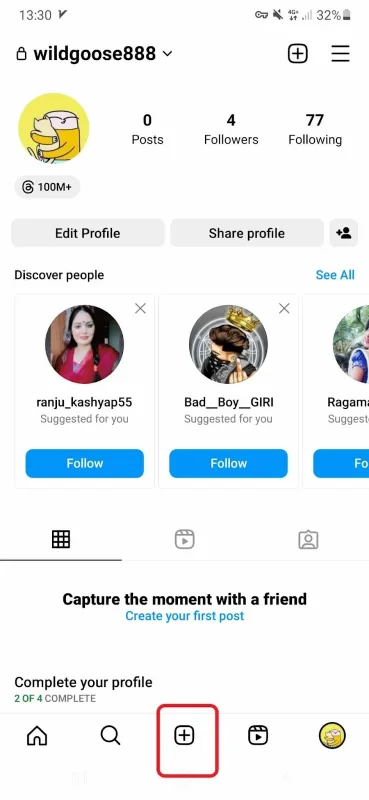
1. Open your Instagram and tap on the (+) icon to start a post.
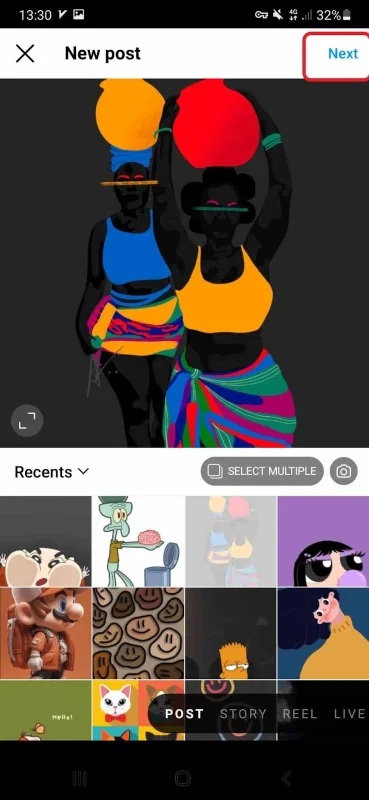
2. Now, select the photo or video to share and click on Next.
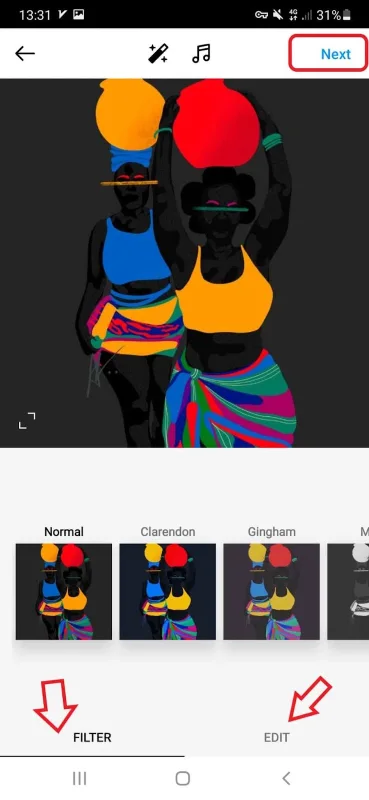
3. Here, you can edit your photo or video by adding Instagram filters or effects.
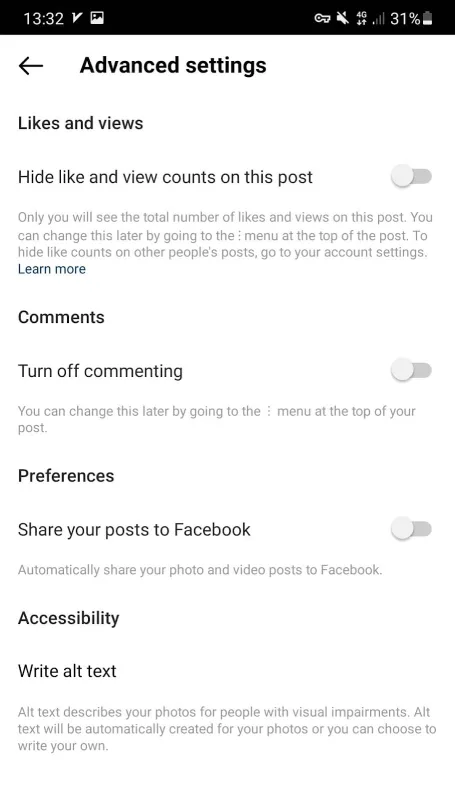
4. After that, you can write a caption, or add location and hashtags. At the bottom, you can also change advanced settings.

5. Within the advanced settings, you have the option to turn off commenting, hide likes, share the post to Facebook, and more.
6. Once you’re done, just tap the back arrow and select “Save draft”.

Now, you’ve made your draft and you can edit or delete it later. The good news is that you are free to create as many as drafts you want.
Note: If you don’t edit the post, tag people, or add a caption or location, you can’t save the post as a draft.
How to draft a story on Instagram?
Saving Instagram stories as a draft is just as simple as the last ones. We’ll walk you through the steps:
- In the bottom center, tap the plus icon to start your story.
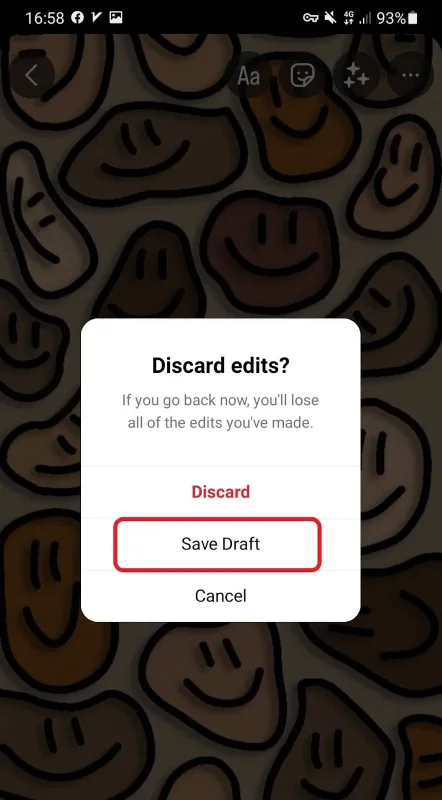
- After picking a picture and adding your preferred Instagram camera tools, tap the back arrow at the top left corner.
- Now, a pop-up will appear, and you should select “Save a draft.”
Draft videos on Instagram
To save videos to drafts while sharing a post, just follow the same steps you did for photos.
After you made your preferred changes (adding text, filters, or more), tap the blue button at the bottom right corner.

Next, include any desired locations and tags, and then click on “Saved draft” located at the bottom left corner.

#2. Access your Instagram drafts
Your draft is saved on your Instagram and you can easily access it. However, finding IG drafts may vary for different devices. Here’s how to access drafts on Instagram (2023) for Android and iOS.
How To Find Drafts On Instagram iPhone?
Using an iPhone? No sweat, just follow these steps:
- Open Instagram and tap the (+) sign at the bottom.
- Then, scroll down to find drafts.
- Tap it, and there you have your saved drafts.
How To Find Drafts On Instagram Android?
Are you an Android user and wondering where are drafts on Instagram on your device? Here are the steps:
- Head over to your account and tap on the (+) to make a new post.
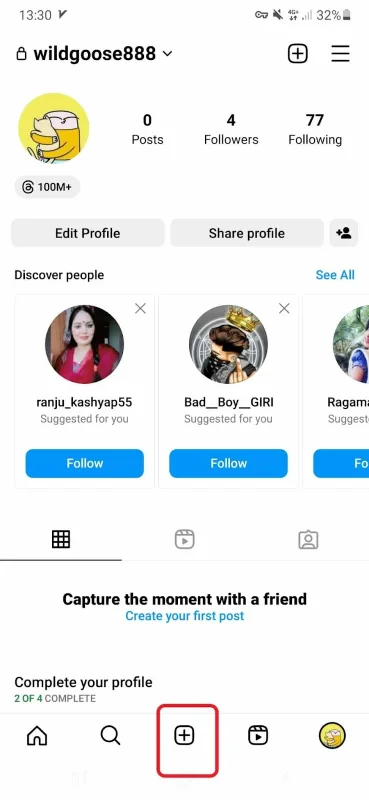
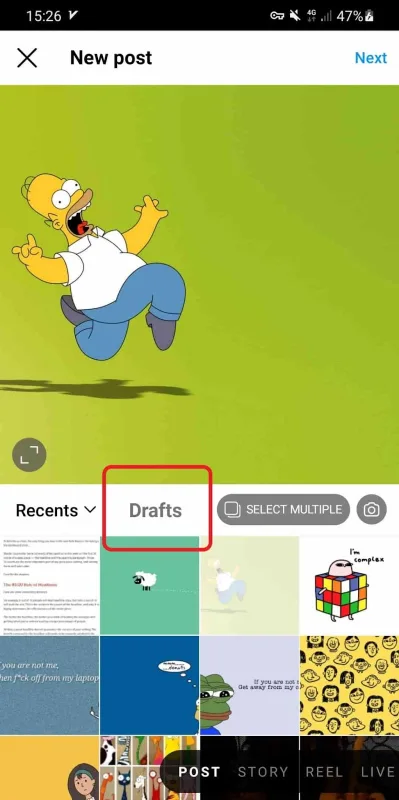
- Now, tap Drafts to find all saved drafts here. Super easy, huh?
Note: Drafts are saved on the device you’re using to create them. Just remember, they’re not shared across devices.
So if you save a draft on one gadget, you won’t see it on another even if you’re logged in with the same account. Keep those drafts device-specific!
#3. How to edit your drafts on Instagram?
Finally, it’s time to edit your drafts and get them ready for sharing (if you don’t want to delete them).
To do this, once you’re in your drafts (as explained earlier), click on “Manage” at the top right corner.

Select the draft you wish to edit, then tap on the “Edit” option. You’ll be taken back to the stage where you can add text, filters, and more. Once you’ve made your edits, simply tap “Share.”

#4. How To Share Draft Posts On Instagram?
Once you’ve saved a post as a draft, sharing it is as simple as sharing a new post. You simply need to head over to your drafts, select the one you want to publish, and tap the blue Share button.
#5. How To Delete Instagram Drafts [2023]
Not happy with your story drafts and looking to get rid of them? Here’s how to delete them.
Tap on your profile picture, just like when you’re about to share a story. Then, look for the square icon at the bottom left corner and tap on it.

Open your drafts and pick the one you want to delete.

finally, hold the story draft and tap the Delete button.

You can also delete multiple drafts at once. To do this, simply tap and hold on to a draft until a checkbox appears next to it. Then, tap on the other drafts you want to delete and select “Discard” from the three-dot menu.
How To Delete Drafts On Instagram Android?
If you are an Android user and want to delete drafts on Instagram, you can follow these simple steps:
- Open the Instagram app on your Android device and go to your feed page.
- Tap the “+” button to share new posts.
- Here you will see all the drafts that you have saved on Instagram. Select the draft that you want to delete.
- Click on the three dots at the top right corner of the screen.
- Select the “Discard Draft” option.
- A confirmation message will appear. Click on “Discard” to confirm that you want to delete the draft.
And that’s it! The selected draft will be deleted from your Instagram account on your Android device.
How To Delete Story Draft In Instagram?
To delete a story draft on Instagram, follow these steps:
- Open the Instagram app on your mobile device and go to your profile page.
- Tap the three horizontal lines in the top right corner to open the menu.
- Select “Settings” from the bottom of the menu.
- Scroll down and tap on “Privacy.”
- Tap on “Story.”
- Under “Saving,” tap “Save to Camera Roll.”
- Ensure the toggle for “Save to Camera Roll” is turned off.
- Go back to your profile page and tap on your profile picture to create a new story.
- You should now see your drafts at the bottom of the screen. Tap and hold on the draft you want to delete.
- Tap “Delete” to remove the draft from your saved stories.
It’s important to note that deleting a story draft will permanently remove it from your saved stories, and you won’t be able to recover it. So, make sure you want to delete the draft before doing so.
How To Delete Draft Video On Instagram?
To delete a drafted video on Instagram, follow these steps:
- Open the Instagram app and tap on the “+” icon on your feed page.
- Tap on the “Dtarfts” section.
- Select the video you want to delete.
- Tap “Manage.”
- Select “Discard.
Just remember, this action only discards the draft, not the original video from your camera roll. Plus, it’s good to tidy up your drafts folder occasionally to save device space and prevent clutter from multiple drafts.
#6. Troubleshoot Instagram Drafts
Instagram users often run into problems with their drafts, like “Instagram drafts not loading” or “Instagram not saving.” While the exact reasons can be unclear, here are some steps you can try to resolve these issues:
Update The Instagram App
To tackle problems with Instagram drafts, start by making sure you’ve got the latest app version. Instagram frequently rolls out updates to fix bugs and enhance performance.
Just head over to the App Store or Google Play Store, find Instagram, and tap “Update” if there’s a new version available. This simple step might just sort out any draft issues you’re facing.
Check Your Internet Connection
Still having trouble accessing your Instagram drafts or creating new ones? There might be an issue with your internet connection.
Check to make sure that you’re connected to a strong, stable Wi-Fi network or that your cellular data is turned on and working properly.
Clear the App Cache
Clearing the app cache could be a handy solution to any Insta-related issue. This will delete any temporary files that may be causing the problem and force the app to reload new data.
To clear the Instagram app cache on an iPhone:
- Go to Settings > General > iPhone Storage.
- Scroll down to find Instagram and tap on it.
- Tap “Offload App” to delete the app and clear the cache.
To clear the Instagram app cache on an Android device:
- Go to Settings > Apps > Instagram.
- Tap on “Storage & cache” and then tap “Clear cache” to delete the app cache.
Contact Instagram Support
If you’ve followed all these troubleshooting steps and are still facing problems with Instagram drafts, it might be a good idea to get in touch with Instagram support. You can contact them through the Help Center or send a direct message to @Instagram on Twitter.
Can’t Find Drafts On Instagram Android? Here’s What To Do
Using an Android device noticing that your Instagram drafts gone? Don’t worry! The drafts button might have been moved to a different spot within the app.
If you can’t locate your drafts, check near the “Cancel” button at the bottom or swipe left on the “Library” screen. If that doesn’t work, update your Instagram app to the latest version. Updates can change button positions and features.
Why My Instagram Drafts Disappeared
If you’ve been using Instagram drafts regularly, you may have experienced a situation where your saved drafts suddenly disappeared. This can be frustrating, especially if you’ve spent a lot of time crafting the perfect post. Here are a few reasons why your Instagram drafts might disappear and what you can do to prevent it from happening again.
A. Instagram Story Drafts Disappeared 2023
One common reason why Instagram drafts disappear is that they are automatically deleted after a certain period of time. In some cases, this can happen after just 24 hours, while in others, drafts may be saved for up to a week. If you don’t finalize your post within the designated timeframe, the draft will be automatically deleted.
Another reason why Instagram drafts might disappear is if there is a glitch in the app. This can happen if you’re using an outdated version of Instagram or if there are bugs in the software. In some cases, simply updating your app to the latest version can solve the problem.
B. Instagram Story Drafts Option Disappeared
If you’re unable to find the drafts option on Instagram, it’s possible that the feature has been temporarily removed from the app. Instagram occasionally makes changes to its features and interface, and drafts may be removed during these updates.
Another reason why the drafts option might disappear is if you’re using a third-party Instagram tool or app. While these tools can be helpful for managing your Instagram account, they may not always be compatible with Instagram’s features.
If you’re using a third-party tool and notice that your drafts have disappeared, try logging out of the tool and accessing Instagram directly to see if your drafts reappear.
Can’t Find Drafts On Instagram iPhone
If you are an iPhone user and having trouble finding your drafts on Instagram, don’t worry, there are a few things you can try. Firstly, ensure you have updated your Instagram app to the latest version. Sometimes, outdated versions can cause problems accessing certain app features.
If you have updated the app and still cannot find your drafts, try restarting your phone and then opening the app again. This can sometimes help to reset any glitches or issues with the app.
If you still cannot find your drafts, try searching for them using the search bar within the app. Simply type in “drafts” and see if any results come up.
If none of these solutions work, your drafts may have been deleted for some reason. Unfortunately, there is no way to recover them once they are deleted, so it is important to regularly save your drafts to your phone or cloud storage to prevent losing them.
Draft Instagram Stories On Desktop
To draft Instagram stories on desktop, you’ll need to use a third-party tool like AiGrow, Hootsuite, or Planoly. These tools allow you to create and schedule Instagram stories ahead of time. Here are the steps to create Instagram story drafts on desktop using AiGrow:
- Sign up for AiGrow and connect your Instagram account.
- Click “Add Instagram account” to connect your Instagram page to AiGrow.
- Choose “Access.”
- Open the “Posts&Scheduling” tab and click “Schedule.”
- You can upload posts/stories/ IGTV videos and schedule them or draft them.
AiGrow is an Instagram management and growth service with multiple features to grow your followers and manage your account. With AiGrow you can draft posts and schedule them in advance to save time.
How To Download Draft Reels From Instagram?
To download a draft reel from Instagram, you first need to ensure that the reel is saved as a draft. Once you have saved the reel as a draft, follow these steps:
- Open the Instagram app on your mobile device and navigate to your feed page.
- Open the story/reels tab by swiping your screen to the right.
- Scroll up to access your drafted reels/stories.
- Choose the video you want and tap the three-dot icon at the top of your screen.
- Select “Save.”
It is important to note that draft reels can only be downloaded to your mobile device and not to a desktop computer.
By following these steps, you can easily download your draft reels from Instagram and save them to your mobile device for future use.
How Do I Save A Reel Draft To My Camera Roll Without Posting It?
If you have created a reel draft on Instagram, you may want to save it to your camera roll without actually posting it. This can be useful if you want to edit the video further or share it on another platform.
To save a reel draft to your camera roll on Instagram:
- Open the Instagram app and navigate to your profile.
- Tap on the three horizontal lines in the top-right corner of the screen to access the menu.
- Select “Settings” from the menu and then tap on “Account.”
- Scroll down and tap the “Original Posts” option.
- Toggle on “Save Original Posts” and “Save Posted Videos.”

By turning on the “Save Original Posts” option, Instagram will automatically save all of your posts, including reel drafts, to your camera roll. This can be a useful feature if you want to back up your content or share it on other platforms.
It’s important to note that if you don’t turn on the “Save Original Posts” option, you won’t be able to save your reel draft to your camera roll without actually posting it on Instagram first.
Can You Save Instagram Reel Drafts To Camera Roll?
Yes, you can save Instagram reel drafts to your camera roll. Here’s how:
- Open the Instagram app on your mobile device and go to your profile.
- Tap on the “Reels” icon located in the bottom menu bar.
- Select the draft reel that you want to save to your camera roll.
- Tap on the three dots in the top right corner of the screen and select “Save Reel” from the dropdown menu.
- The reel draft will now be saved to your camera roll.
Note: Make sure to give the Instagram app access to your camera roll when prompted. Additionally, keep in mind that this feature may not be available in all regions or on all devices.
How Do You Find Unsaved Drafts On Instagram
If you were working on an Instagram draft but forgot to save it, it can be frustrating to try and find it again. Unfortunately, there is no surefire way to find unsaved drafts on Instagram. However, there are a few things you can try:
- Check your phone’s memory: If you were in the process of creating a post or story, but didn’t save it, there may be a temporary file saved on your phone’s memory. Go to your phone’s file manager and look for a folder named “Instagram” or “Temp” to see if the draft is there.
- Look in your camera roll: If you took a photo or video for your draft, it may be saved in your camera roll. Look for any recent photos or videos that you don’t remember taking, as they may be part of your unsaved draft.
- Check Instagram’s drafts folder: Even if you didn’t save your draft, Instagram may have automatically saved it to your drafts folder. To check, open Instagram and tap on the plus sign to create a new post. Then, tap on “Library” and select “Drafts” to see if your unsaved draft is there.
It’s important to remember that Instagram drafts will only be saved for a certain period of time. If you don’t save your draft or publish it within a few days, it may be automatically deleted by Instagram. So, it’s always a good idea to save your drafts as you work on them to avoid losing your progress.
How To Post Draft Reels On Instagram Story
If you have a draft reel that you want to post on your Instagram story, here are the steps to follow:
- Open the Instagram app on your mobile device and go to your profile.
- Tap on the draft reel you want to post on your story.
- Click on the three dots in the top right corner of the screen.
- Tap on “Share” and then select “Your Story” from the list of options.
- Edit your story by adding text, stickers, or other elements to your post.
- Once you have made the necessary edits, tap on “Send To” and then select “Share” to post your draft reel on your Instagram story.
It’s important to note that when you post a draft reel on your story, it will only be available for 24 hours before it disappears. However, you can always save it to your camera roll or archive it for future use.
Instagram drafts FAQs
Can Anyone See My Drafts On Instagram?
When you save drafts on Instagram, they are only visible to you and cannot be viewed by anyone else. This means that no one can see your drafts unless you share them. The drafts are saved in your account’s Drafts folder and are not accessible by anyone else.
What happens if I accidentally publish drafts in Instagram?
If you accidentally publish a draft instead of saving it, it will be visible to your followers and anyone who visits your profile. So, make sure to double-check before publishing any post on Instagram.
To make sure your drafts are even more secure, I recommend turning on two-factor authentication and setting up a strong, unique password for your Instagram account. This way, you can keep both your drafts and your entire account safe from any unauthorized access.
How many Instagram drafts can I have at once?
You can make and save as many as drafts you want on Instagram.
How Long Do Instagram Drafts Last?
When you make a draft on Instagram, it stays in your Drafts folder until you either delete it or share it. How long it stays there depends on the type of post:
- Regular posts: You can keep your drafts as long as you want. They won’t vanish unless you remove or post them.
- Instagram stories: Drafts stick around for seven days, then they’re gone. But you can save them on your device by hitting “Save” to keep them longer.
- Instagram reels: Your drafts hang on for 30 days, then they disappear.
Remember, once a draft is deleted, it’s gone for good. So, be sure to save the drafts you want to keep before they get automatically removed.
Can you save drafts on instagram desktop?
Curious about how to save instagram post as draft on computer? Well, badly, you can’t save your posts as drafts on the Instagram web. Plus, Instagram doesn’t let you access the drafts you saved on your mobile on the desktop.
Can you save Instagram darfts to phone gallery?
Sorry to say that you can’t directly save drafts to your device gallery. But there’s a workaround! You can take a screenshot of your draft and keep it that way.
How to recover drafts on Instagram?
If you happen to delete a draft by accident, there’s no way to retrieve it. Instagram doesn’t store deleted drafts in the “Recently deleted” folder or any other data.
So, if you’re wondering how to recover story drafts on Instagram, sadly, it’s a no-go.
