


Sometimes, you might accidentally unfollow someone on Instagram and find yourself pondering, “How to see who I unfollowed on Instagram?”
Fear not! You can see who you’ve unfollowed by examining your followers, reviewing likes on your posts, or experimenting with third-party apps. How exactly? Delve into this blog for a step-by-step guide.
Can You See Who You Unfollowed on Instagram?
The answer is: You can’t directly see who you’ve recently unfollowed on Instagram or who you used to follow. But some shortcuts may help you out. Let’s explore them.
Suggested post: How to Remove Instagram Inactive Accounts?
How to See Who I Unfollowed on Instagram With Apps (A test)
There are loads of tracker apps that claim to track your followers and unfollowers on Instagram. However, only a handful, or even fewer, can show the accounts you’ve unfollowed on Instagram.
I put some tracker apps to the test, including Followers & Unfollowers, InFollow, FollowMeter, InstaFollow, iStalk, and Followers Tracker.
But only FollowMeter is capable of showing who I unfollowed on Instagram.
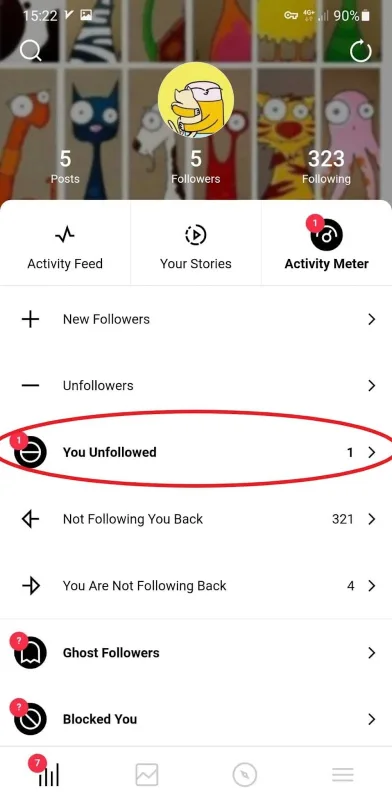
FollowMeter is available on both Google Play Store and the App Store. You need to download the app, log into your account, and synchronize your data to use it.
FollowMeter scores a decent 3.5 stars from 140k reviews and has been downloaded over 5 million times on the Google Play Store. Now, let’s check out what the users are saying in the reviews:

FollowMeter Pros
- This app is convenient and quick
- It provides more features like Instagram analytics.
- It’s user-friendly.
FollowMeter Cons
- Before you install the app, it won’t show you who you used to follow on Instagram and have since unfollowed. It starts tracking unfollows from when you install it.
- They might risk your privacy.
- The data they provide is not 100% accurate.
- Some have limited features in their free versions.
You Might Like to Read: FollowMeter Review
How to See Who I Unfollowed on Instagram (Without an App)
Unfortunately, Instagram doesn’t offer a built-in feature to track your unfollow history (at least not yet!). To uncover this information, you’ll need to resort to one of the methods outlined below:
Note: In the “Your Activity” feature, you can only track your likes, comments, tags, reviews, stories, sticker responses, bios, searches, and links you’ve visited but No info on people you’ve unfollowed.
Suggested Post: How to Unfollow on Instagram Fast
#1. Check the Likes and Comments of Your Posts
If your following list is not too lengthy, there’s a manual way on how to see accounts you’ve unfollowed on Instagram:
- Choose any of your posts and open up the likes or comments.
- Take a scroll through the likes and spot the ones you’re not following anymore.
- If you want to reconnect, just tap the blue Follow button.

#2. Check the Posts You’ve Liked or Commented on
Another manual way to see who you used to follow on Instagram is by going through ‘Your Activity’ and checking all your likes and comments within a certain time. You can also track your sticker responses or tagged posts. Here is how to do so:
- Go to your profile and tap the three-line icon at the top right.
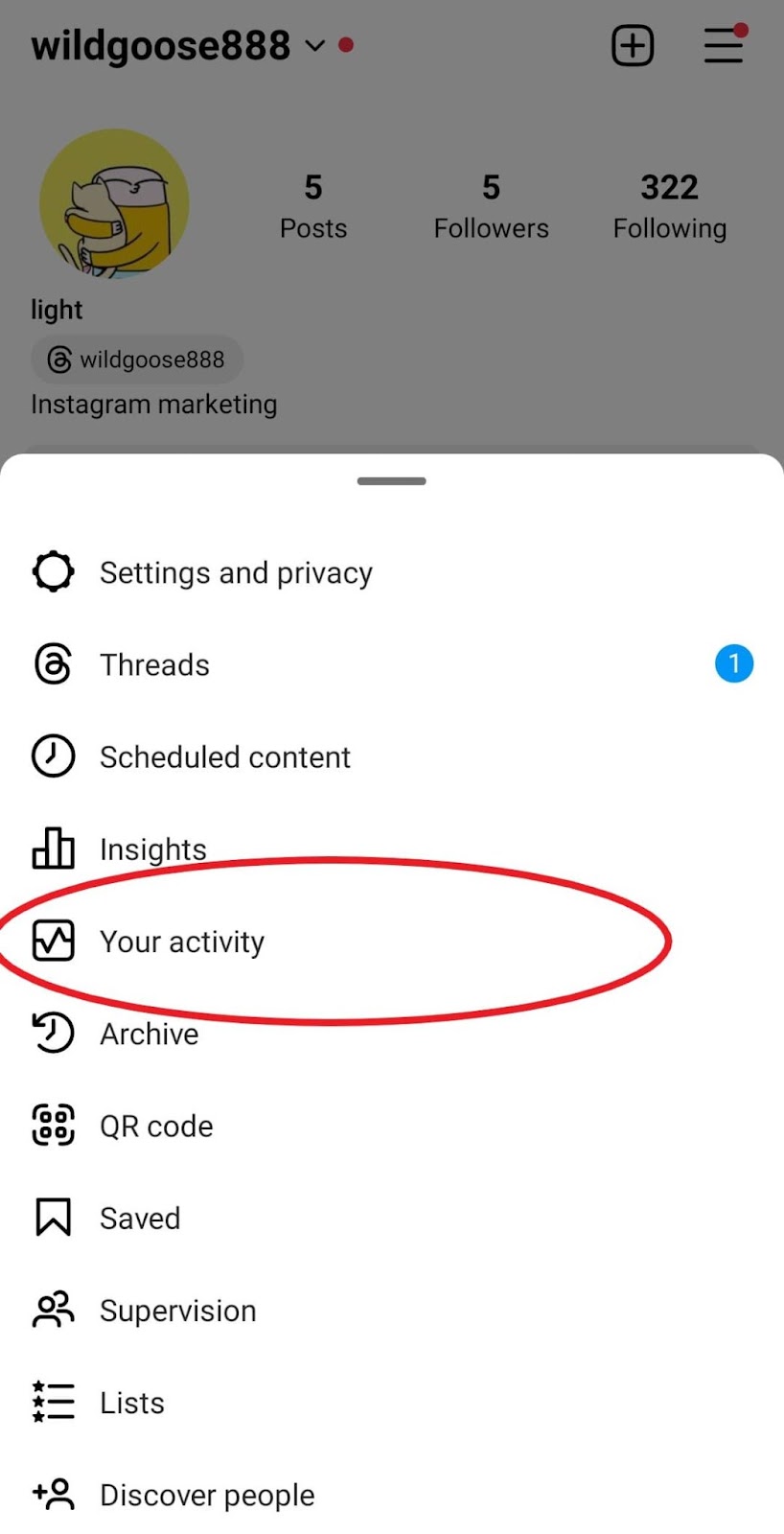
- Now, click on ‘Your Activity’ and open likes or comments.
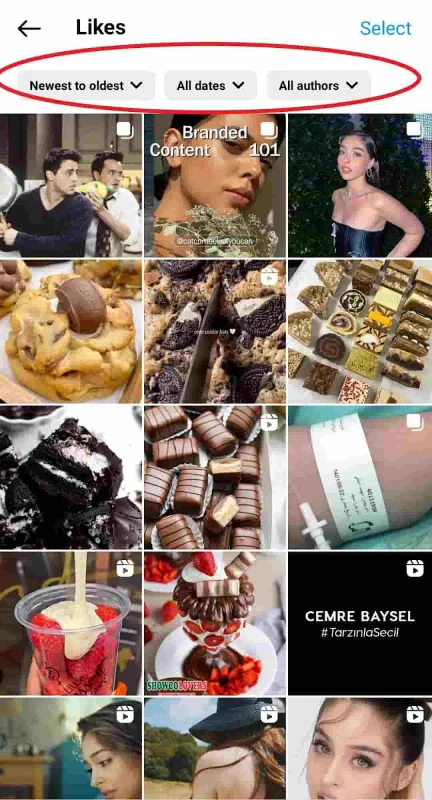
- Here, you can view all your likes or comments and even sort the results based on time (from newest to oldest or by setting a start and end date) or author. Then, check the profiles of people to see if you’re still following them.
Suggested Post: How to Know Who Unfollowed You on Instagram
#3. View Your Yollowers’ List
If your followers’ list isn’t too long, you can run through it and spot those you don’t follow back or you might have unfollowed accidentally. Just look for a Follow next to their name.

Pros & Cons of Manual Methods
Pros: No security risks are threatening your privacy
Cons: They can be time-consuming and rely on memory, making them less reliable.
Find out how to see Who Doesn’t Follow You Back on Instagram.
4. Download Your Data on Instagram
You can request a download of your Instagram data which includes a list of people you follow. Then, you can compare the list to your current following list to see who you unfollowed on Instagram.
To download your data on Instagram, follow these steps:
- Tap the three lines on the top right side of the screen.
- Go to ‘Security’.
- Under ‘Data and History’, tap ‘Download Data’.
- Enter your email and tap ‘Request Download’.
Enter your Instagram password and tap ‘Next’. You’ll receive an email with a link to download your data within 48 hours.
FAQs
Here are a few frequently asked questions (FAQs) about the process of how to see who I unfollowed on Instagram.
Q1. Can You See Who You Unfollowed on Instagram?
No, Instagram doesn’t offer a direct way to see who you’ve unfollowed. However, you can use third-party apps, check your post likes and comments, review the posts you’ve engaged with, or manually go through your followers list for clues.
Q2. Can You See When You Unfollowed Someone on Instagram?
No, when you unfollow someone on Instagram, the platform doesn’t send them a notification, so they won’t be aware of the action or the timing. This is also true for third-party apps.
Q3. Are Third-Party Apps Safe to Use for Tracking Unfollowers on Instagram?
Some apps are safe, while others require more caution when using. It’s wise to check their privacy policies and customer reviews before installing.
Q4. How to Check Instagram Unfollow History?
You can’t check your unfollow history on Instagram, but you can download your data from Instagram and compare your following lists together to see who you’ve unfollowed.
Q5. How Do You See Who You Followed in the Past on Instagram?
If you want to see who you used to follow on Instagram, you can download your data on Instagram and check your following lists.
Q6. How to See Everyone You’ve Ever Followed on Instagram?
You can download your data on Instagram to see everyone you’ve ever followed on Instagram.
