

Instagram is one of the most popular social media platforms, with over a billion active users. Many people use Instagram to showcase their life or business, and it’s essential to have an up-to-date bio that accurately reflects who you are. However, sometimes we may lose our old bios and struggle to retrieve them. If you’re wondering how to see old Instagram bios, you’re in the right place. In this article, we’ll provide a step-by-step guide to retrieving your lost bios.
How To See Old Instagram Bios 2023?
Seeing old Instagram bios can be tricky, but it is possible. Here’s how to see old Instagram Bios in the app:
- Open Instagram and go to your profile page.
- Click on the three horizontal lines in the top-right corner of your screen.
- Click on Settings at the bottom of the menu.
- Click on Account.
- Scroll down and click on “Access Data.”
- Click on “View Account Data.”
- Enter your email address and request a copy of your data.

- Once you receive the data, open the folder and look for the “Instagram Profile” folder.
- Open the folder and see a file named “profile.json.”
- Open the file, and you can see all your old Instagram bios.
How To See Others Old Instagram Bios?
You will need their consent if you want to see someone else’s old Instagram bio. Here’s how you can do it:
- Ask the person if they have a copy of their old Instagram data.
- If they do, ask them to send you the file containing their old Instagram bios.
- If they don’t have a copy, ask them to follow the abovementioned steps to request their Instagram data.
Note: Based on Instagram privacy guidelines, there are no ways to access other users’ account data. So your only options are to ask them for the data file or their account password.
How To See Old Instagram Bios On iPhone?
If you’re using an iPhone, you can see your old Instagram bios by following these steps:
- Open the Settings app on your iPhone.
- Tap on your Apple ID at the top of the screen.
- Tap on “iCloud.”
- Scroll down and turn on “Photos.”
- Wait for your photos to sync with iCloud.
- Open the Photos app on your iPhone.
- Tap on “Albums” at the bottom of the screen.
- Scroll down and tap on “Instagram.”
- You will be able to see all your old Instagram bios in the “Instagram” album.

Instagram Bio Deleted By Itself
If your Instagram bio disappeared in 2023, there could be several reasons. Here are some of the most common reasons why did my Instagram bio get deleted:
- Instagram may have deleted your bio due to violating their community guidelines.
- You may have accidentally deleted your bio.
- There may have been a glitch in the system.
If your bio was deleted due to a violation of community guidelines, you will receive a notification from Instagram explaining the reason for the deletion. If you accidentally deleted your bio, you can retrieve it from the steps mentioned above.
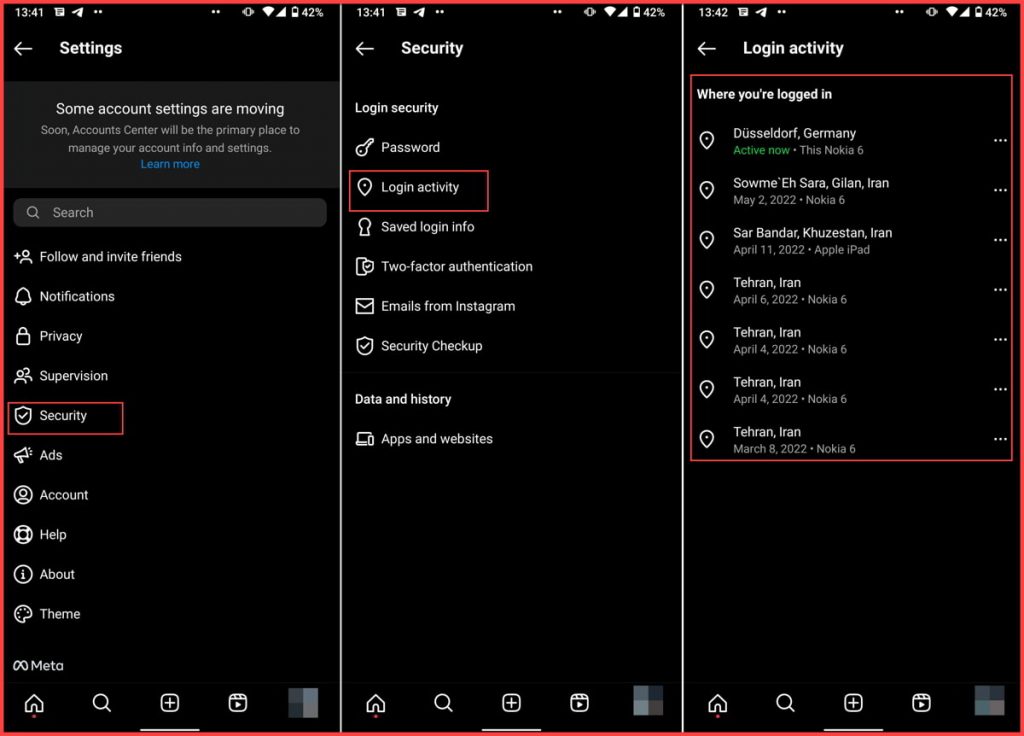
Another possible reason that your Instagram bio got removed without you doing it is that someone else has access to your account. So before anything else, check the devices logged into your account. Here is how to do it:
- Log into your Instagram account and go to your profile.
- Tap the three-line button at the top-right corner and choose “Settings.”
- Tap “Security.”
- Select “Login Activity.”
- In this section, you can see where you logged in to your account and with what device.
- Remove the device and change your password immediately if you see something suspicious.
Instagram Bio History Apps
You can use third-party apps and tools to check your old bio Instagram history regularly. These apps allow you to see your past history Bio Instagram and others’ bios (if they’re public). However, remember that these apps may not be reliable and could even compromise your account’s security.
Instead, follow the mentioned steps to learn How to See Old Instagram Bios on your account setting and check Instagram bio history, which is safe and secure.
Also read: Top Instagram bio ideas & trends
How to See Old Bios on Instagram on a Different Device or Phone
If you’ve lost access to your old device or phone but still want to see your old Instagram bios, you can easily log into your account on a different device or phone. Simply download the Instagram app and log in using your account credentials to learn how to see bio history on Instagram. Once you’re logged in, you can view your old bios in your profile section.
How to See Your Old Instagram Bios Without Logging In
If you can’t access your Instagram account, you can still see your old bios using a third-party app. One such app is called “Instagram Bio History.” This app lets you view your old bios without logging into your account.
How to Find Old Instagram Bios Using the Internet Archive Wayback Machine

The Internet Archive Wayback Machine is a digital archive of the internet that allows users to view old versions of websites. This tool can view old versions of your Instagram profile and bios. Simply enter your Instagram profile URL into the Wayback Machine search bar, and you can view old versions of your profile, including your old bios.
How to Retrieve Old Instagram Bios Using Google Cache
Google Cache is a feature that allows you to view cached versions of websites. You can use this tool to view your old Instagram bios. Simply search for your Instagram profile on Google, and then click the down arrow next to the URL. From there, select “Cached” to view a cached version of your profile, including your old bios.
Conclusion
Losing your old Instagram bios can be frustrating, but there are ways to retrieve them. If you want to see your own old bios, you can do it easily from your profile, but if you want to check others’ past bios, you need to use third-party tools (which we don’t recommend). This article showed you how to safely see old Instagram bios on different devices.
FAQs
Can You See Your Old Instagram Bios?
If you have changed your Instagram bio in the past but need to access the old bios, there are still some ways to try. To view your old Instagram bios, you can:
- Download Instagram data on the app
- Use third-party tools
- Check google cache
- Use Internet archive Wayback machine
Where Did My Instagram Bio Go?
It’s not uncommon for Instagram to remove or hide bios for various reasons, including violating community guidelines or being flagged as spam. Additionally, if you’ve changed your bio, your previous bio will no longer be visible on your profile. However, just because your old bio is no longer visible on your profile doesn’t mean it’s gone forever. It’s still possible to see your old bio if you know where to look.
How Do I Get My Old Instagram Bio Back?
If you’ve changed your Instagram bio and want to see your previous bio, you can do so by accessing your account data. Here’s how:
- Open Instagram and go to your profile.
- Tap the three lines in the upper-right corner.
- Tap “Settings” at the bottom of the menu.
- Tap “Security.”
- Tap “Download Data.”
- Enter your email address and password and tap “Request Download.”
- Instagram will email you a link to download your data. Follow the instructions in the email to download your data.
- Once you’ve downloaded your data, open the file and look for the “profile.json” file.
- Open the “profile.json” file in a text editor and search for “biography” to find your old Instagram bio.
How Do I See All My Old Instagram Bios?
If you want to see your old Instagram bios, you can use a third-party app called “Timehop.” Here’s how:
- Download the Timehop app from the App Store or Google Play Store.
- Sign in to Timehop with your Instagram account.
- Swipe left on the Timehop screen until you see your old Instagram bios.
Why Does Instagram Remove My Bio?
Instagram may remove or hide bios that violate community guidelines or are flagged as spam. Additionally, if you change your bio, your previous bio will no longer be visible on your profile.
How To See Previous Instagram Bios Of Celebrities Or Public Figures?
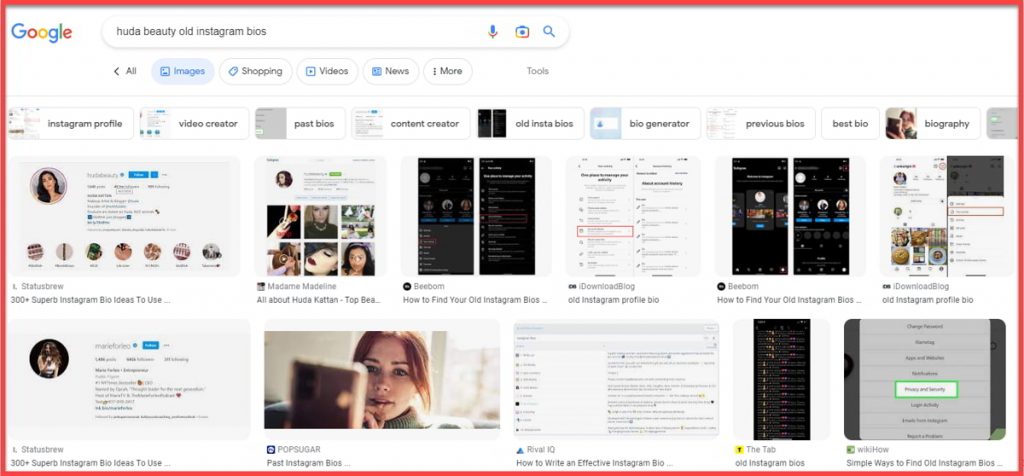
If you want to see the old Instagram bios of celebrities or public figures, your only option is to search on google. You can usually find images of their old bio or user screenshots.
How To Access Old Instagram Bios Of An Account That Has Been Hacked Or Compromised?
If an Instagram account has been hacked or compromised, accessing the old Instagram bios may be difficult. However, you can try to recover the account by resetting the password. Here’s how:
- Go to the Instagram login page.
- Click “Forgot password?”
- Enter the username or email address associated with the account.
- Follow the instructions to reset the password.
- Once you’ve reset the password, you can access the account and see the old Instagram bios.
How To Find Old Instagram Bios Of Accounts That Have Been Renamed Or Rebranded?
If an Instagram account has been renamed or rebranded, its old bio may no longer be visible. However, there are a few methods you can try to find their old bio:
Method 1: Use Google Cache
Google Cache is a way to see the previous version of a website. You can use this method to see the old Instagram bio of an account renamed or rebranded. Follow these steps:
- Open Google.com and type the Instagram username in the search bar.
- Click the down arrow next to the URL and select “Cached.”
- Scroll down to find the bio section and see the old Instagram bio.
Method 2: Use Archive.org
Archive.org is a website that allows you to see the old version of a website. Follow these steps to see the old Instagram bio:
- Go to Archive.org and type in the Instagram username in the search bar.
- Click on the most recent snapshot to find the bio section.
- You will be able to see the old Instagram bio.
What to Do When You Can’t See Your Friend’s Old Instagram Bio
If you are trying to find your friend’s old Instagram bio, and you can’t see it, there are a few things you can do:
- Method 1: Ask Your Friend
- Method 2: Check Social Media Posts or Captions
- Method 3: Use a Third-Party Tool
