

If you’re in a situation where you want to limit someone’s interaction with you without blocking them on Instagram, restriction is a great way to do it. This can be helpful if someone is being harassing or abusive, or if you just want to take a break from interacting with them for a while. But how to restrict someone on Instagram?
In this blog post, I’ll walk you through the process of restricting someone on Instagram step-by-step.
I’ll also explain what happens when you restrict someone, and how you can unrestrict them if you change your mind. So keep scrolling!
How to Restrict someone on Instagram from their profile
To restrict someone on Instagram, follow these steps:
- Go to the person’s profile.
- Tap the three dots in the top right corner of the screen.
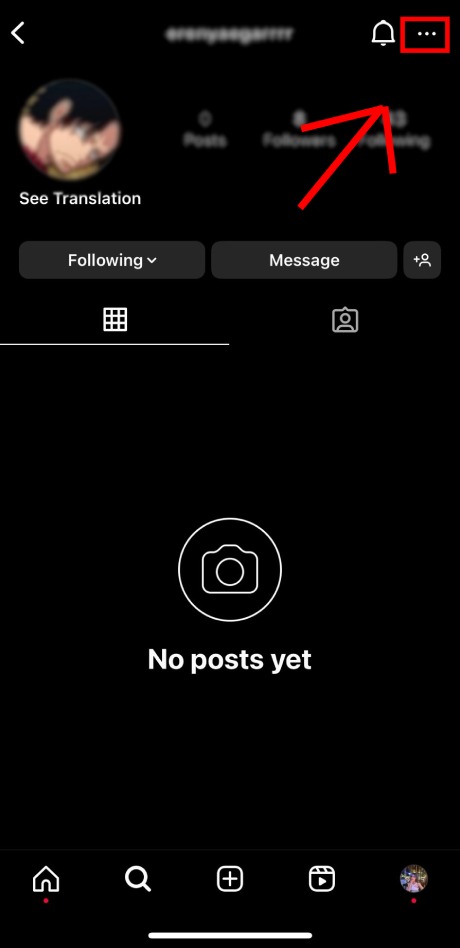
- Select Restrict.

- Review the changes that restricting the person will make, and tap Restrict Account to confirm.

Once you have restricted someone, they will still be able to see your profile and posts, but their comments on your posts will be hidden from everyone except you.
You will also not be able to see their stories or live videos, or when they were last active. However, they will still be able to see your stories and posts, unless you have blocked them in return.
Read more: “We Restrict Certain Activity to protect our community” [6 ways to fix in 2023]
There are also other ways to restrict someone on Instagram:
Restricting Someone through Direct Messages
If you’ve been receiving unwanted or spam DMs on Instagram, you can now take steps to protect yourself by restricting the sender directly from your Direct Messages section.
- Open the Instagram app and navigate to your chat section.
- Locate the conversation with the user you want to restrict.
- Tap on their name at the top of the chat thread.

- From the menu on the next window, choose the “Restrict” option.

Restricting Someone on instagram via a Comment
If you wish to prevent a user from leaving comments on your Instagram posts, you can achieve this by placing them under restriction. To stop someone from commenting on your posts:
- Access your Instagram post and select “View all comments.”
- Tap and hold on the comment made by the user you want to restrict.
- Click on the exclamation icon positioned at the top-right corner.
- Then, tap on “Restrict” to place restrictions on that user.
Once you’ve completed these steps, the restricted user will no longer be able to leave comments on your posts without your approval.
Restricting Someone in Settings
You can also restrict a user through your Instagram settings, even if you’ve never engaged in a conversation with them or viewed their comments.
- Launch the Instagram app and go to your profile page.
- Tap the three horizontal lines menu at the top-right corner to access the Menu.
- Navigate to “Settings” and select “Privacy.”

- Next, choose “Restricted accounts” and tap “Continue.”

To restrict an account, search for it using the Search bar.

select “Restrict” next to their username.

How to unrestrict someone on Instagram?
To unrestrict someone, follow the same steps above, but select Unrestrict Account in the third step.
Here are some reasons why you might want to restrict someone on Instagram:
- They are leaving negative or harassing comments on your posts.
- You are uncomfortable with their behavior or the types of content they post.
- You want to limit your interactions with them without blocking them altogether.
It is important to note that restricting someone is a privacy setting, and it will not notify the person that you have restricted them.
How to restrict someone from seeing your followers on instagram
There is no direct way to restrict someone from seeing your followers on Instagram. However, there are two workarounds that you can use:
1. Make your account private
When your account is private, only people who you approve to follow you can see your followers list. To make your account private:
- Go to your profile.
- Tap the three lines in the top right corner of the screen.
- Tap Settings.
- Tap Privacy.
- Toggle on Private Account.
2. Block the person
Blocking someone will prevent them from seeing your profile, posts, and followers list altogether. To block someone:
- Go to the person’s profile.
- Tap the three dots in the top right corner of the screen.
- Tap Block.
- Tap Block again to confirm.
Which option you choose depends on your personal preference and the reason why you want to restrict someone from seeing your followers.
If you only want to prevent one person from seeing your followers, then blocking them is the best option.
If you want to prevent everyone from seeing your followers, then making your account private is the best option.
FAQs
Now let’s answer some frequently asked questions on this matter:
Can restricted accounts see if I viewed their story?
No, restricted accounts cannot see if you have viewed their story. When you view a restricted account’s story, they will not receive a notification. However, if you leave a comment on their story, they will be able to see that you have viewed it.
When you restrict someone on Instagram do they know?
No, Instagram does not notify users when they are restricted.
What does it look like when someone restricts you on Instagram?
When someone restricts you on Instagram, you will still be able to see their profile and posts, but your interactions with them will be limited. For example:
- Your comments on their posts will be hidden from everyone except you until they approve them.
- You will not be able to see their stories or live videos.
- You will not be able to see when they were last active.
- They will still be able to see your stories and posts, unless you have blocked them in return.
What happens when you restrict someone on Instagram stories?
When you restrict someone on Instagram stories, they will not be able to see your stories. However, if you tag them in a story, they will still be able to see it.
Can you stop someone from seeing your Instagram posts without blocking?
Yes, you can stop someone from seeing your Instagram posts without blocking them. To do this, you can make your account private. This will prevent anyone from seeing your posts unless you approve their follow request.
Final thoughts
Restricting someone is a simple process, and it’s important to know how to do it if you ever need to.
In this blog post, I’ve walked you through the steps of restricting someone on Instagram, and I’ve also explained what happens when you restrict someone and how to unrestrict them.
If you’re ever unsure about whether or not to restrict someone, it’s always best to err on the side of caution.
Restricting someone is a harmless way to protect yourself from unwanted interactions.
