

TikTok is all about scrolling until 3 AM and enjoying videos so much that you keep saying to yourself “One more TikTok and then I’ll be done”. If you keep seeing videos you don’t like, then what’s the point of TikTok? This is where you need to learn how to reset TikTok algorithm.
If somehow you’ve accidentally messed up your TikTok algorithm and are cursed to miss popular TikTok songs and watch videos you’re not interested in at all, this blog is for you. I’m going to teach you how to reset TikTok algorithm on iPhone and Android. And don’t worry, it’s super easy and you can do it in 6 simple steps.
How Does TikTok Algorithm Work?
First, let’s understand TikTok’s algorithm and how it works. Then, when we have a better understanding of this, we’ll see how to change the TikTok algorithm.
TikTok’s algorithm works by carefully analyzing your activity on the platform. Activities like how long you spend on a video, whether you watch it till the end or skip it, commenting, saving, liking, or searching for a specific type of content, all affect your TikTok algorithm and what you see on your FYP.
Here are more detailed explanations about the factors TikTok considers to form your algorithm:
- Watch Time: TikTok looks at how long you watch a video. Do you watch it till the end? Do you scroll it? The more you watch a video, the more TikTok will suggest it to you.
- Likes and Comments: If you like and comment on some videos, you’re literally telling TikTok “More of this please!”.
- Your Creations: If you’re someone who records and edits TikTok videos about challenges, TikTok will show you more videos of it. For example, if you use some filters that need you to rate movie characters from 1 to 10, your FYP is going to be filled with this kind of video.
- Your Follows: By following an account, you’re telling TikTok that you’re interested in that topic. So, TikTok will show you more of that type of content.
- Virals and Trends: If a video is gaining a lot of attention, TikTok will automatically put it in people’s FYP so they can see and enjoy it. That’s why you always know what’s viral, what’s trending, and more.
Basically, TikTok will show what you seem to enjoy.
Also, there is another theory. Some users believe that sometimes, when you talk about something to your friends, TikTok will show you a video about that later. It’s weird, but it happens. For example, if you talk about someone’s wedding, you might see wedding dress videos. Now let’s see how to reset the algorithm on TikTok.
How to Reset TikTok Algorithm on iPhone and Android
You can reset your TikTok’s algorithm using these tips:
- Refresh (Clean) your ‘For You’ page through TikTok’s settings.
- Clear TikTok’s cache through the application.
- Search for the content you like.
- Stay, rewatch, like, comment, and save the content you like.
- Select ‘not Interested’ for videos you don’t like.
- Unfollow accounts With content that you dislike.
Now let’s explain each of these factors more and make them clear:
1. Clean Your ‘For You’ Page Through TikTok’s Settings
This method is a special reset feature that TikTok has specially put in for its audience. Using this feature you can reset your FYP and clean TikTok’s algorithm. Your FYP will start showing new and popular videos, and fewer videos based on your previous likes and views. Here’s how to reset TikTok’s For You Page:
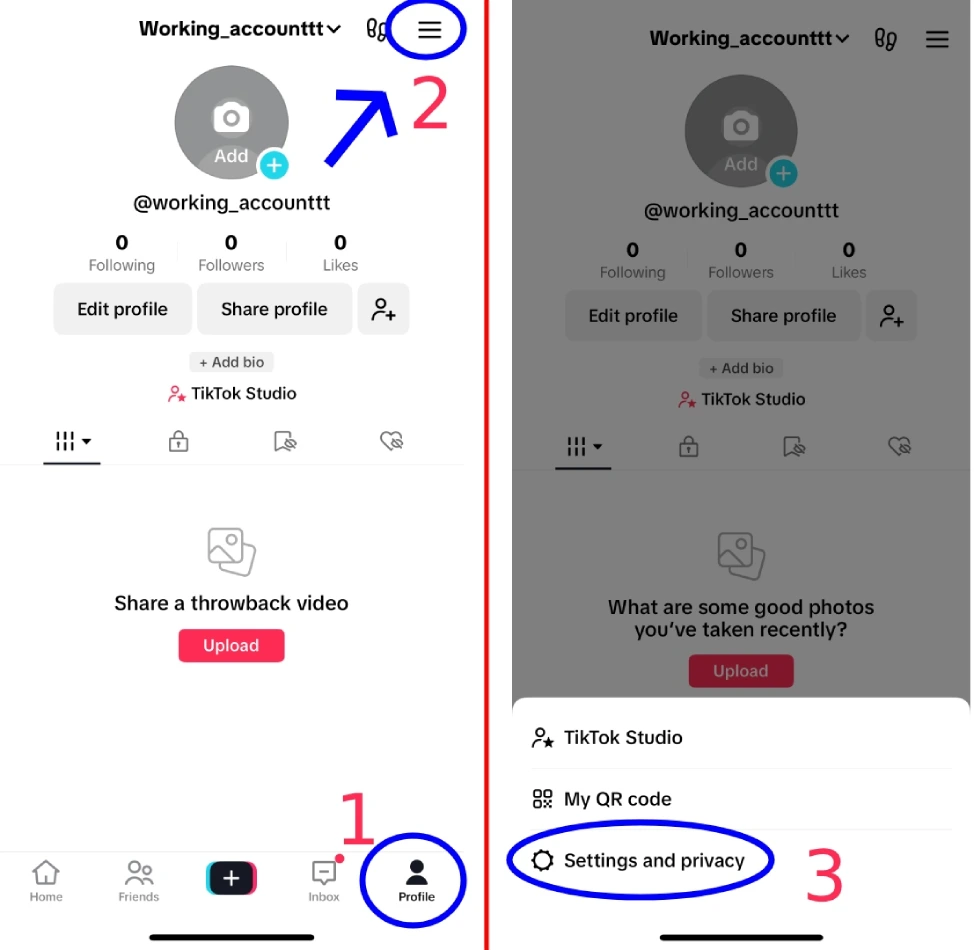
- Go to your profile.
- Tap on the three-line menu icon in the top right corner.
- Select ‘Settings And Privacy’.
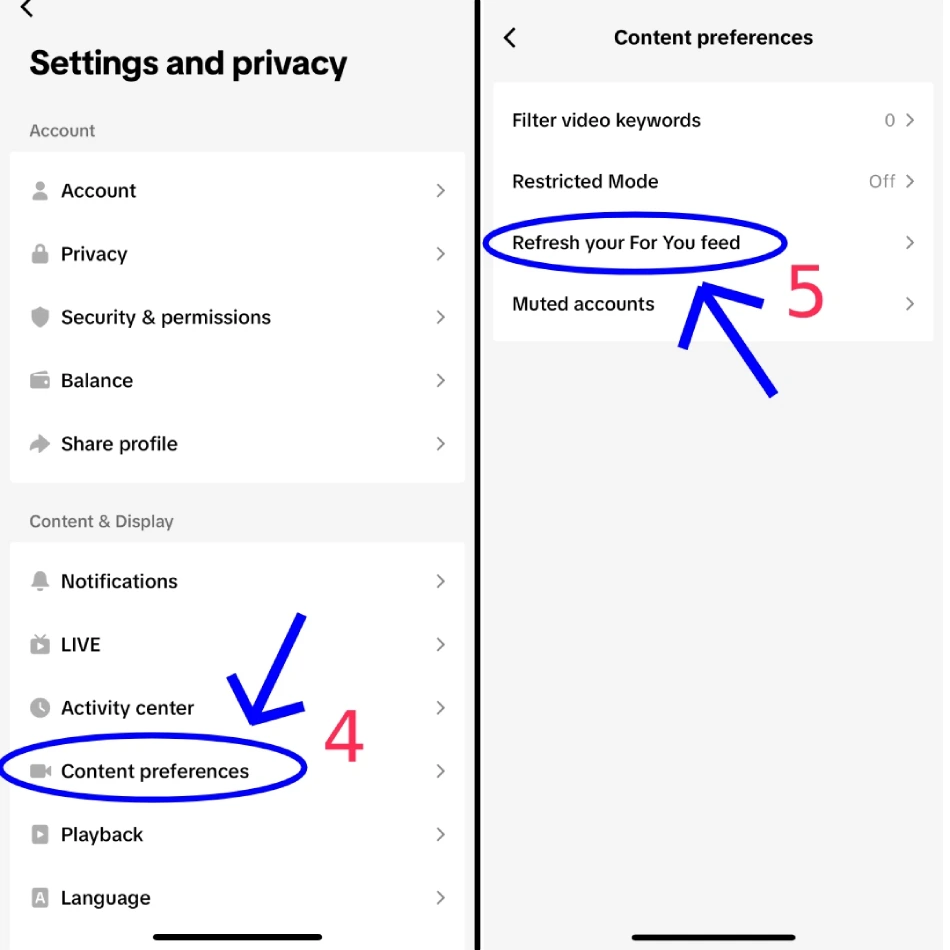
- Scroll down to ‘Contetn Preferences’.
- Choose ‘Refresh Your For You Page’.
- Confirm by tapping ‘Continue’.
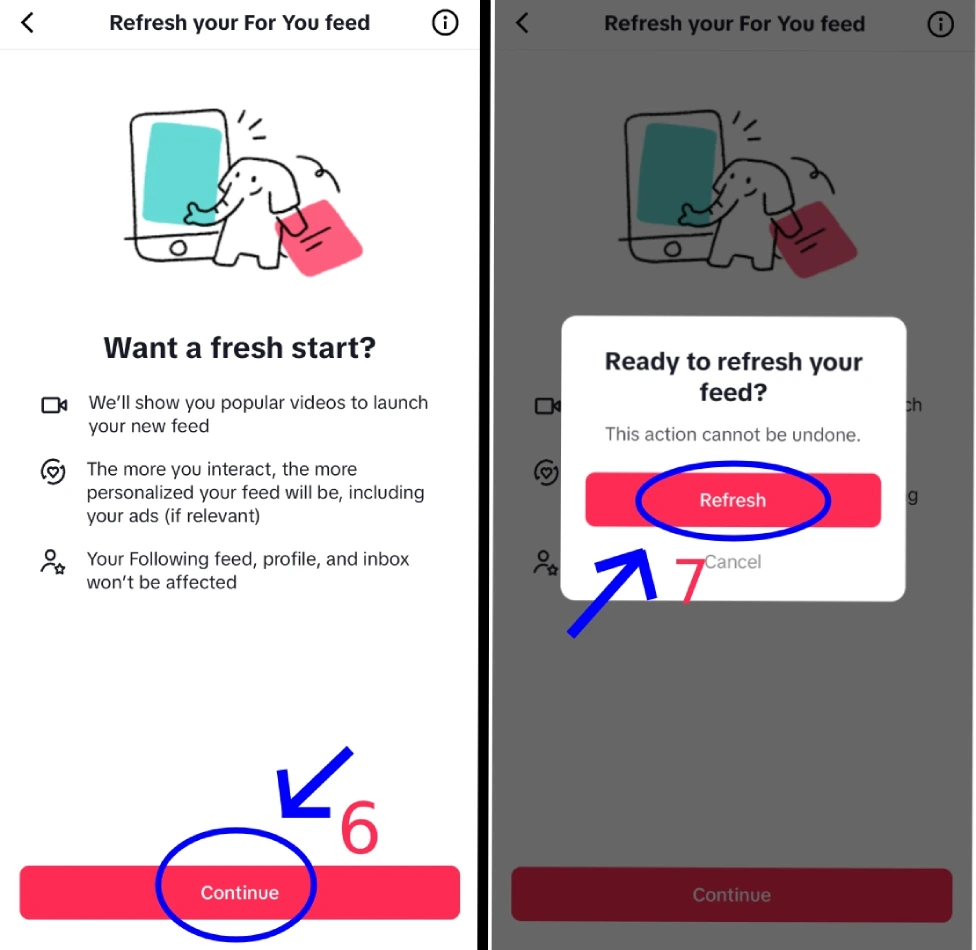
💡 Note: Resetting your FYP does not affect your following or inbox.
2. Clear TikTok’s Cache through the Application
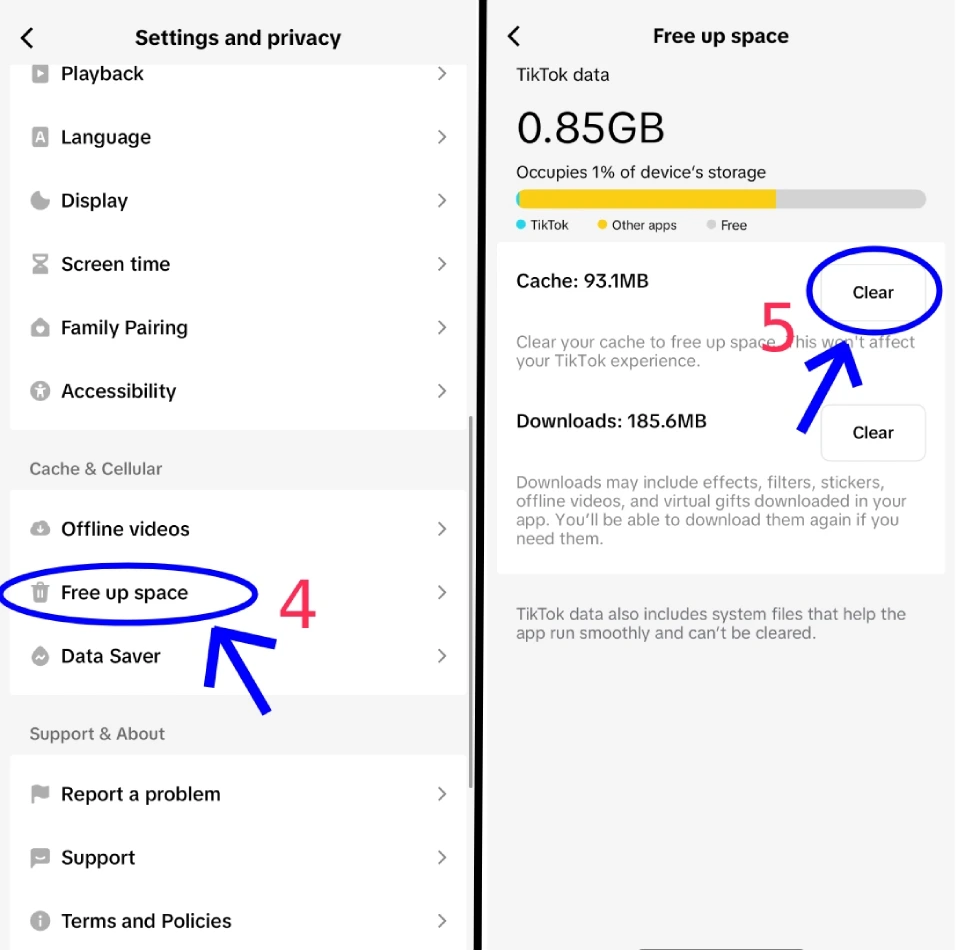
This method is like having a fresh start. By clearing TikTok’s cache, you will delete every information TikTok knows about your taste in TikTok videos. Your for you page will be brand new and you can shape the TikTok algorithm all over again. Here’s how to clear TikTok cache:
- Go to your profile and access settings from the three-line menu in the top-right corner.
- Select ‘Settings and Privacy’ from the menu.
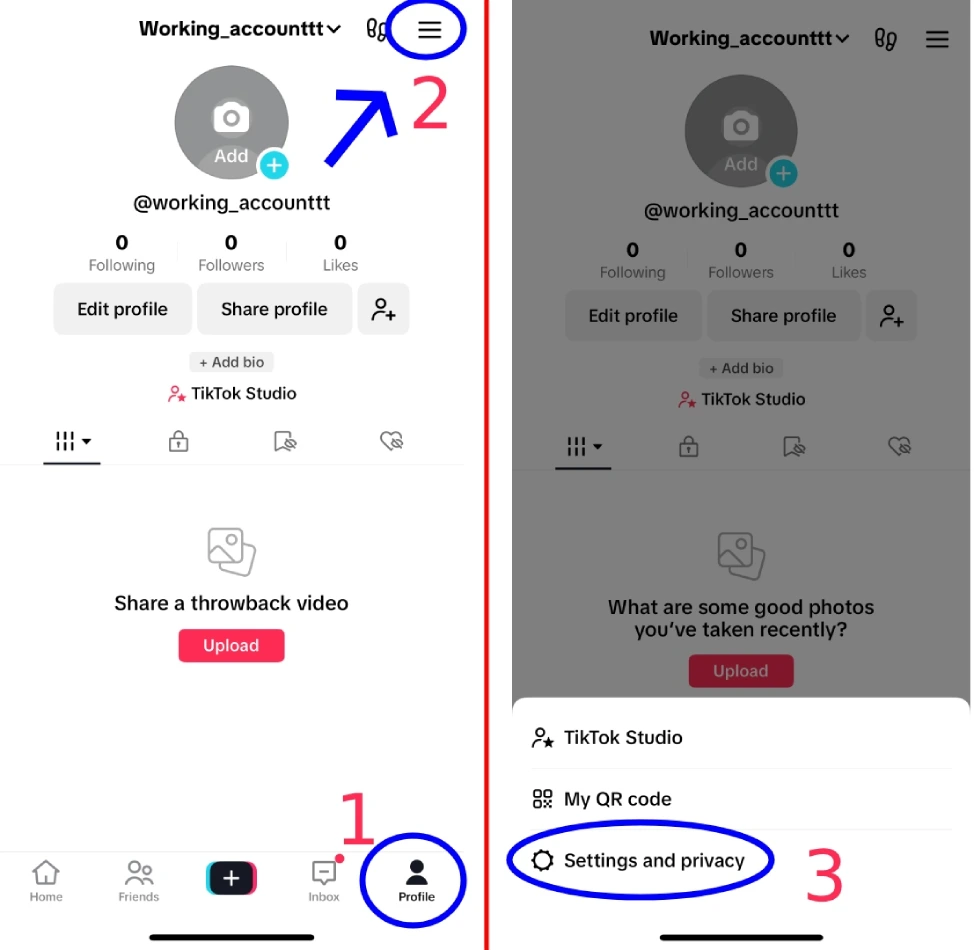
- Scroll down to see the ‘Free Up Space’ option.
- Tap ‘Clear ’ and confirm.
3. Search for The Content You Like
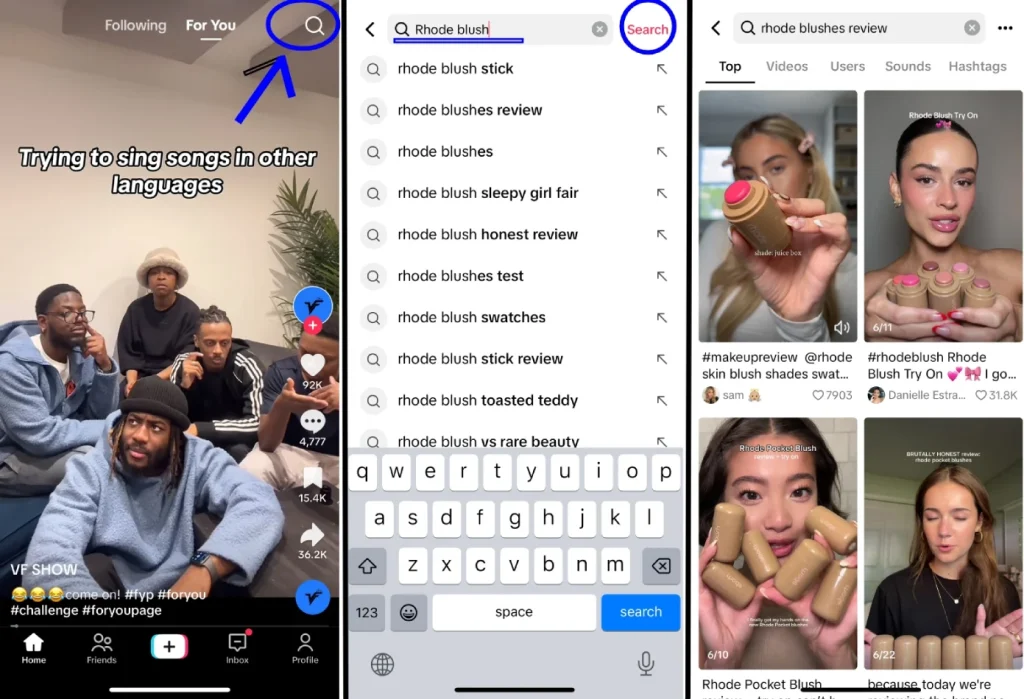
The first step to changing the TikTok algorithm is to search for the content you like. If you like makeup, search for makeup brands, tutorials, and beauty bloggers.
Then, go through them for a while, check out different accounts, watch some videos, like, save, etc.
This way, you’re telling TikTok “This is the kind of content I’m looking for”. And TikTok will hear you loud and clear and will put more makeup stuff in your FYP.
4. Interact with the Content You Like The Content You Like
This part is very important. TikTok pays close attention to what kind of videos you will watch till the end. Because that means you’re interested in that type of content.
So stay, rewatch, like, comment, save the content you like, and scroll through other content. This way, in a couple of hours, your FYP will change entirely.
5. Select ‘Not Interested’ for Videos You Don’t Like
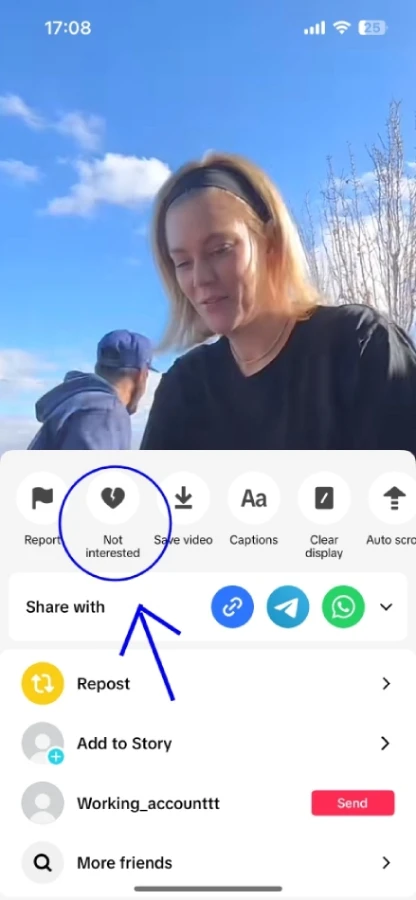
If you still see videos that you don’t like, you can directly inform TikTok that you’re not interested in these kinds of videos. To do this, tap and hold on to the video, and a pop-up menu will show up. Then, select ‘Not Interested’.
6. Unfollow Accounts with Contents That You Dislike
As I mentioned above, by following an account you’re telling TikTok “I follow this account because I like the content”. So, in order to reset the TikTok algorithm, unfollow accounts on TikTok that post content you don’t want to see in your FYP.
Final Thoughts
That’s it! With these 6 tips, you can easily reset TikTok’s algorithm and enjoy your time scrolling through TikTok. Keep in mind that the algorithm learns from your interactions. So, skip the content you dislike and avoid interacting with that content in any way.
FAQs
Here are the most frequently asked questions about resetting TikTok’s algorithm:
Q1. Will Resetting TikTok Algorithm Affect My Followers or The Accounts I Follow?
No, resetting TikTok’s algorithm won’t affect your followers or who you follow. It will only change the content suggested on your for you page.
Q2. How Often Can I Reset My TikTok Algorithm?
There is no limit on how often you can reset your TikTok algorithm. But it’s better to give TikTok some time to learn your preferences after each reset.
Q3. What Happens After I Reset the Algorithm?
TikTok will start suggesting a broader range of videos, and over time, it will refine these suggestions based on your new interactions.
Q4. Can I Influence TikTok Algorithm Without Resetting It?
Yes, you can influence your TikTok algorithm by interacting with the content you like and using the ‘Not Interested’ option on content you don’t like. You can gradually shape your FYP.
Q5. Does Clearing My TikTok App Data Reset the Algorithm?
Clearing app data can have a similar effect to resetting the algorithm, but it’s recommended to use the in-app reset feature for a more straightforward approach.
Q6. How Do I Restart My TikTok Algorithm?
Go to your profile settings, tap on ‘Content Preferences’, find the option to ‘Refresh Your For You Page’, and confirm the action.
Q7. How do I Clean My TikTok Algorithm?
To clean your TikTok algorithm, you need to reset it. Go to your profile settings, tap on ‘Content Preferences’, find the option to ‘Refresh Your For You Page’, and confirm the action.
