

Live photos might be the best invention ever. You can capture those fleeting moments of magic, a splash of laughter, or a playful pet. But so many people don’t know how to post a live photo on Instagram and share those sweet 1-2 seconds with their friends.
Instagram doesn’t directly support posting live photos, but you have options! In this blog, I’ll teach you how to post motion photos on Instagram for Android and IOS. doesn’t matter if your picture is bouncing, motion, live, or anything. I’ll teach you how to share your moments on Instagram. So read on!
How to Post a Live Photo on Instagram as a Video?
If you want to post a live photo on Instagram as a short video, follow these steps:
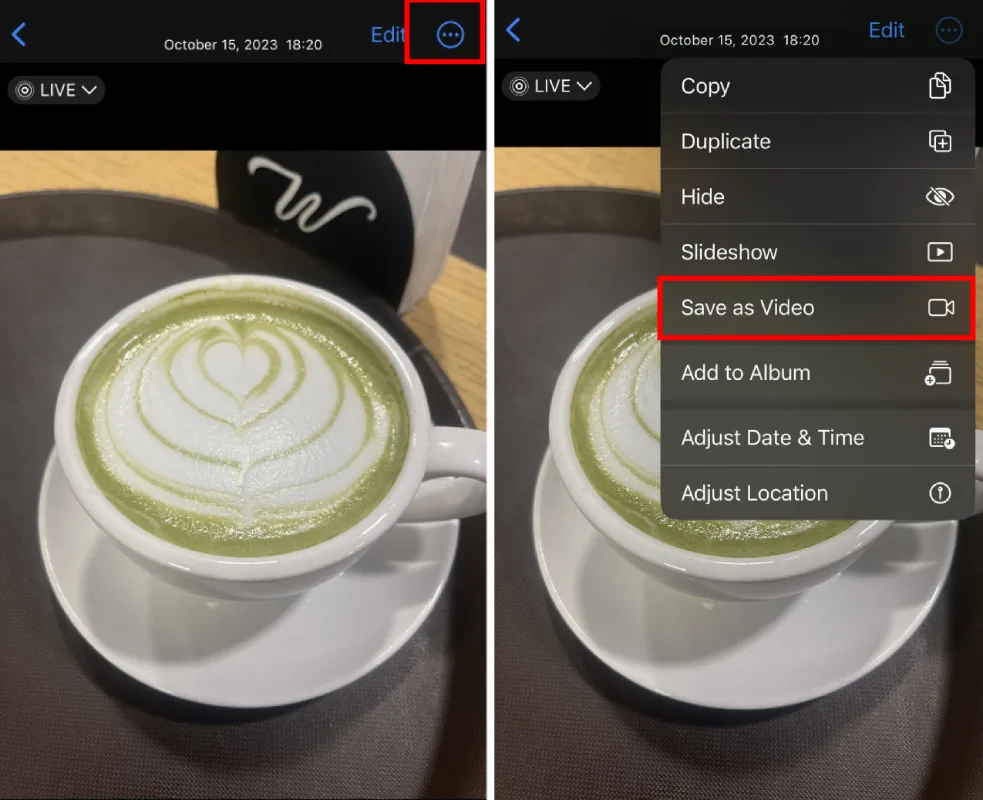
- Open your Photos app and select the Live Photo you want to use.
- Swipe upwards on the photo and choose “Save as video.” You’ll find this option underneath “Use as Wallpaper.”
- Open the Instagram app.
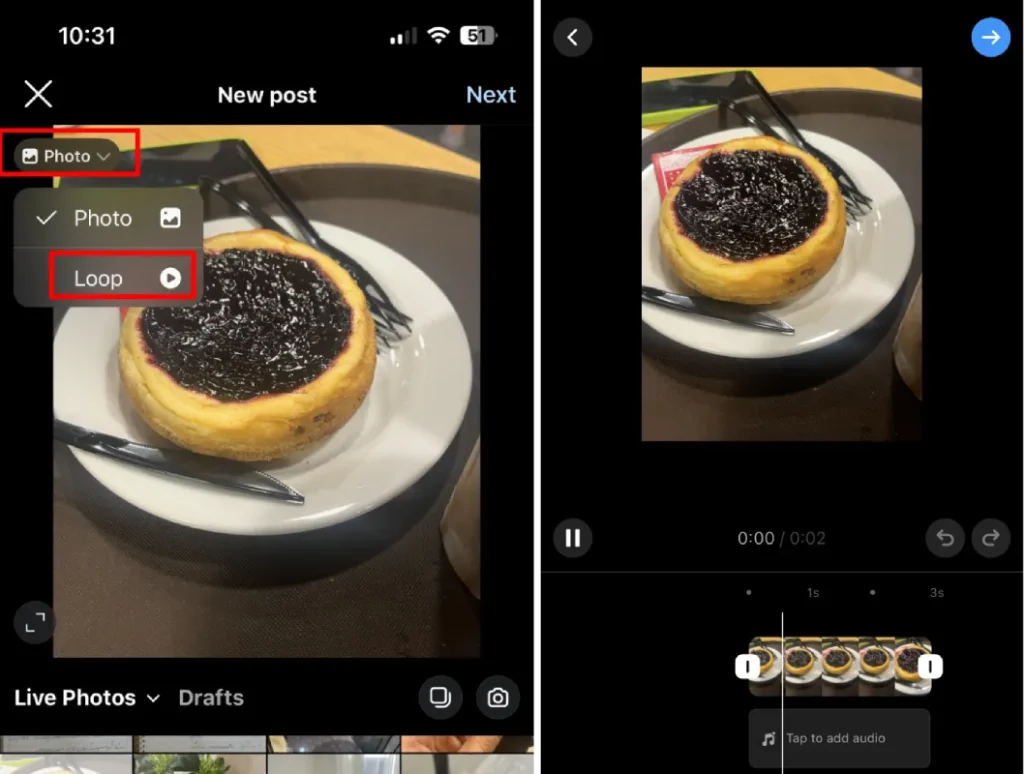
- Tap the plus sign in the app’s bottom menu (located between the magnifying glass and heart icons).
- Select the video you saved from your photo library. (You need to allow Instagram to access your photos.) You can edit your photo as needed.
- Tap “Next” in the top right.
- Add your caption, location ideas and information, and other details.
- Hit “Share” to post your Live Photo as a video.
How to Post Live Photo on Instagram Story
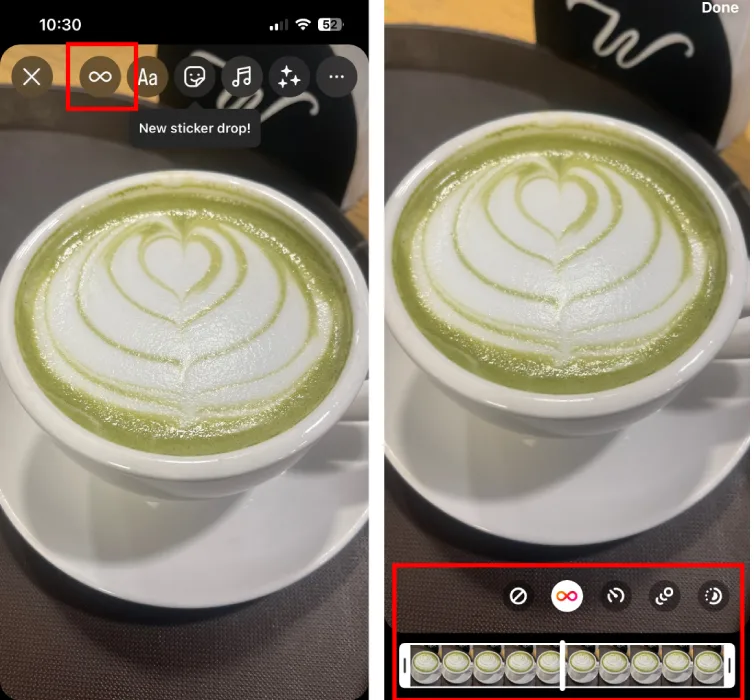
You can post live photos on IG stories as a boomerang. For this, you need to know how to loop a video on Instagram.
If you don’t know, Here is how to post live photos as boomerang on Instagram:
- Open Instagram.
- Tap the camera icon in the top-left corner of the screen to access the “Stories” section.
- Scroll through the bottom menu until you see “Boomerang.” Tap it (you may also find it as an infinity icon on the left-side floating menu).
- Tap the white circle on the bottom menu to begin capturing your Live Photo when you see the Boomerang icon appear.
- Add text or edit your Live Photo as desired.
- Press “Send To” in the lower right corner. You can choose to send it to your story, close friends, or someone you follow
How to Post a Live Photo on Instagram With Sound
This is the same as posting a live photo on Instagram as a video. You need to follow the same instructions.
- Open your Photos app and select the Live Photo you want to use.
- Save it as a video.
- Open the Instagram app.
- Tap the plus sign in the app’s bottom menu.
- Select the video you saved
- Tap “Next” in the top right.
- Add your caption
- Hit “Share” to post your Live Photo as a video.
Read more: Instagram Camera: How to Use It+ Tips & Tricks
How to Post iPhone Bounce Photos on Instagram?
Bounce photos are no different from live photos. You need to follow the same instruction if you want to post them on Instagram. If it’s a story, share them as boomerangs. If you want to post them, save them as a video in your phone’s gallery and then share them on IG.
One last solution
If by any chance you failed to save your live photo as a video, there is another solution that is not so common. You might even call it weird. Anyway, here it is:
- Swipe down on your phone
- Tap on the screen record icon
- Open your gallery, tap and hold on the live photo, and record it
- Cut the few seconds at the beginning and after your screen record
- Tada, you have your live photo as a video, go ahead and post it
Conclusion
In conclusion, while Instagram doesn’t directly support posting live photos, you have options! Breathe life into your stories with the fun, looping effect of a Boomerang created from your live photo.
If you want a more classic video format for your feed, simply save the live photo as a video first. With these tips, you can share those special moments captured in live photo and keep your Instagram feed sparkling.
FAQs
Now let’s answer some frequently asked questions on this matter:
Can You Post Live Pictures on Instagram?
Yes, you can post them as a boomerang or a short video.
How to Post a Live Photo as a Video?
Save your live photo as a video on your phone, then post the video on Instagram.
How do I Post My Live on Instagram?
If you want to add it to your story, you need to share it as a boomerang. If you want to post it, you need to save the live photo as a video in your gallery, and then post it on IG.
How to Use Live Photos in Reels?
You need to use them as videos. Save the live photo as a video in your gallery, and then post it as a short reel.
How Do You Put a Live Profile Picture on Instagram?
Unfortunately, this is not possible yet. You can’t post a live photo as your profile picture.
