

One essential feature of every social media platform is messaging. TikTok, alongside other social media platforms, has direct messages where you can communicate with your friends. But how to message someone on TikTok?
In general, TikTok has special rules for many of its features. For example, to go live on TikTok, you must reach a certain number of followers. Even simple features like messaging on TikTok have rules that users must follow. One of them is that you can’t message a user unless they follow you. Anyway, we’ll get to the rules soon.
In this blog, we’ll explore the ins and outs of messaging on TikTok and share workarounds that will ensure you can slide into DMs with ease, regardless of your device. Let’s start!
Rules of Messaging on TikTok
Here are the rules you need to follow when you want to message someone on TikTok:
- First of all, you need to know that to be able to message someone on TikTok, they should be your friend. Meaning they should follow you and you should follow them back. Also, you need to be over 16 to be able to message someone on TikTok (Keep this in mind Gene Alpha!).
- TikTok’s direct messaging feature allows you to send messages, TikTok videos, gifs, and stickers. However, due to privacy and safety reasons, you cannot send photos or any other media that does not come from TikTok’s platform. For example, you can’t send a picture from your camera roll.
- You are allowed to send a video recorded with the TikTok camera to your friend via direct messages on TikTok.
Different Ways to Message Someone on TikTok
There are a few ways you can slide through someone’s inbox on TikTok. You can do it through your inbox, their profile, or on your for you page by sending a post to them. Let’s check these out. First, let’s see how to message your friends on TikTok direct messages:
1. Messaging Friends on TikTok
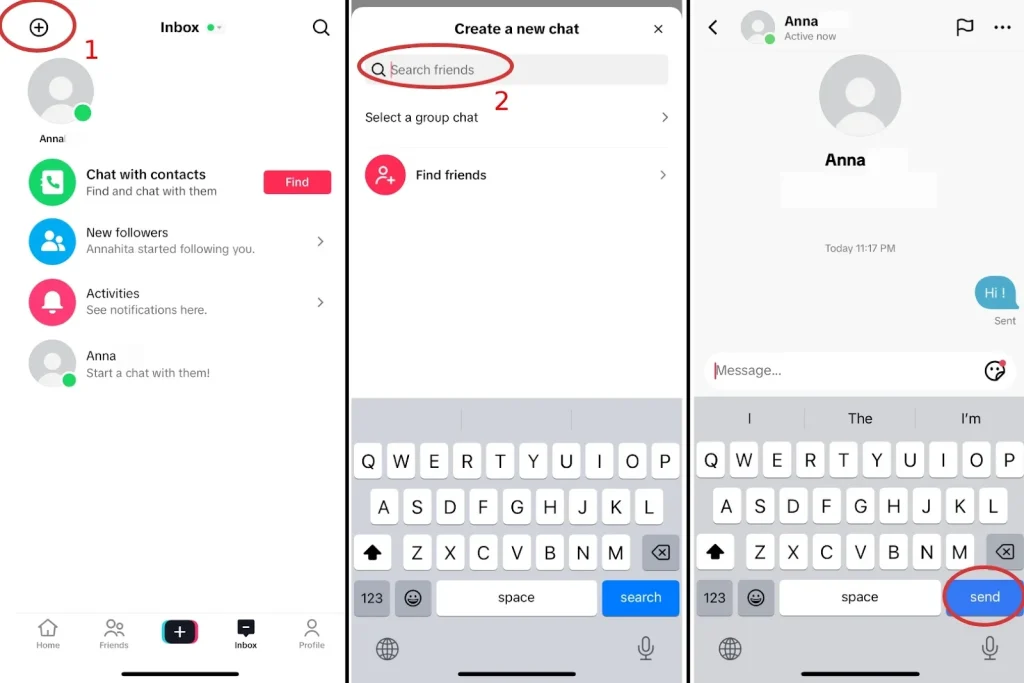
Sending messages to friends on TikTok is quite easy. You can do it via your inbox. All you need to do is follow these simple steps:
- Open TikTok and tap on the inbox icon at the bottom of the screen.
- Tap the ‘New Messages’ icon at the top of the screen.
- Choose the person you want to message from your list of friends or use the search function (search for their username) to find them.
- When their chat opens, write your message.
- Tap the send icon and send your message.
1.1 How to Message Someone on TikTok Without Them Following You
Sometimes, on your ‘for your’ page, TikTok suggests videos that you might like to react to by sending a message. For example, sharing your personal experience, answering their question, encouraging them if they’re going through a hard time, etc.
To message people who appear on your for you page without being friends, follow these steps:
- Tap on their profile picture or their username at the bottom left side of the screen.
- Tap ‘Message’.
- Write your message and send it.
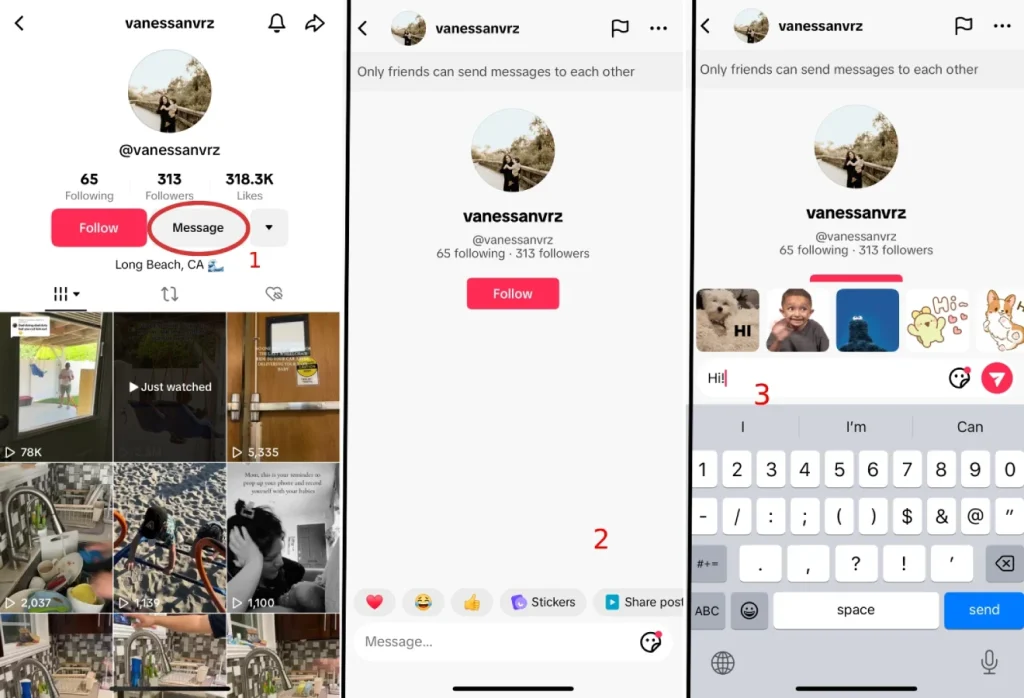
Keep in mind that because you’re not friends with that user and they don’t follow you, you can only send up to 3 messages, and then you have to wait till the receiver accepts your message request.
Suggested Post: Is It Easier to Grow on TikTok or Instagram?
1.2 How to Message Someone on TikTok With a Private Account
Messaging someone on TikTok who has a private account can be a bit tricky because of privacy restrictions. TikTok usually allows users to send messages only if the following conditions are met:
- The person with the private account has their direct messages settings set to ‘Allow Messages From Everyone’ (As you may know, you can set your DM setting to receive messages from everyone, only your friends, or no one).
- Even though they have a private account, you are friends on TikTok and you can easily send messages to each other.
If the person’s account is private and they haven’t set their direct message setting to ‘Everone’, you won’t be able to send them a message unless they follow you. So, you could send them a follow request and wait for their approval, then you can message them.
1.3 How to Message Someone on TikTok Without a Phone Number
You don’t need a phone number to be able to message someone on TikTok. The only place where TikTok will ask for your phone number is when you’re signing up to TikTok. TikTok will use your phone number to search and find your contact accounts (family and friends), so it can suggest you follow them.
You should also know that TikTok will not share your phone number with anyone. It’s just an easy way for you to find your contacts on TikTok.
Also, even when you’re signing up on TikTok, you can choose not to enter your phone number and sign up by using your email or Facebook account.
Once you have created your account on TikTok with your email address, you can send people messages. The only rules are 1) the other person should have had their direct messages settings set to ‘Allow Messages From Everyone’ 2) you should be friends with them, or if you’re not friends, they should accept your request to message them.
2. How to Send a Video on TikTok via Direct Messages?
Here’s how you can do it:
- Record your video using the TikTok camera.
- Once you’re satisfied with the video, tap ‘Next’.
- Add any effects or edits you want.
- On the post page, before sharing, tap on the ‘…’ or ‘share’ icon.
- From the share options, select ‘Send to’.
- Choose your friend’s profile and send it to them.

3. How to Share TikTok Videos with Your Friends
When you see a video on your for you page on TikTok and you want to share it with your friends, all you have to do is follow these simple steps:
- At the bottom right side of the screen, you’ll see a share icon tap on it.
- Now you’ll see a list of your friends that based on your interactions, TikTok suggests you share the video with them. Tap on the account that you wish to send the video to. If you don’t find the right person in that list, search for their username and tap on it.
- Tap Send.

4. How to Message Someone on TikTok on PC
Messaging someone on TikTok on a PC is exactly like how you do it on your phone, the only difference is that the screen is bigger. Here’s how to do it:
- Log into your TikTok account on the TikTok website.
- Search for the user you want to send a message to.
- Click on the ‘Message’ button located under their profile picture.
- Type your message.
- Tap the send button.
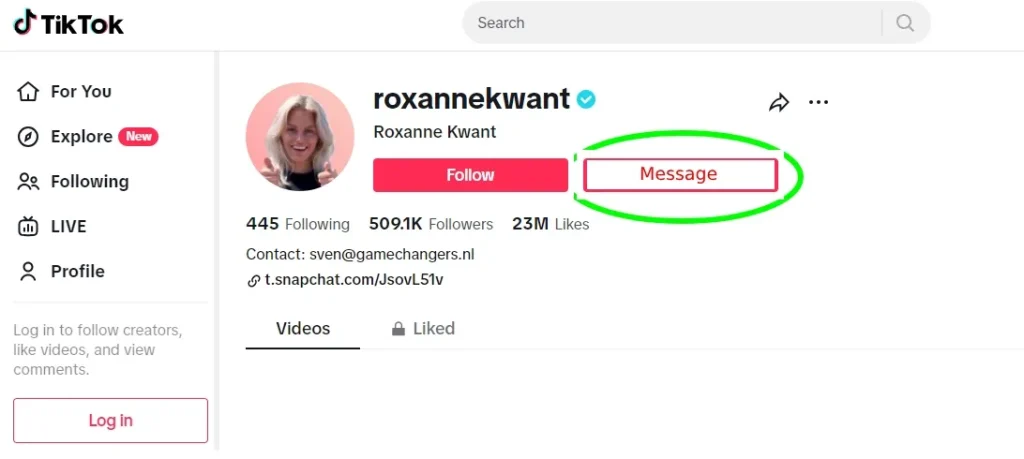
Or, if you already have an ongoing conversation with a user, just open your inbox and click on their chat.
How to Know If Someone Read Your Message on TikTok?
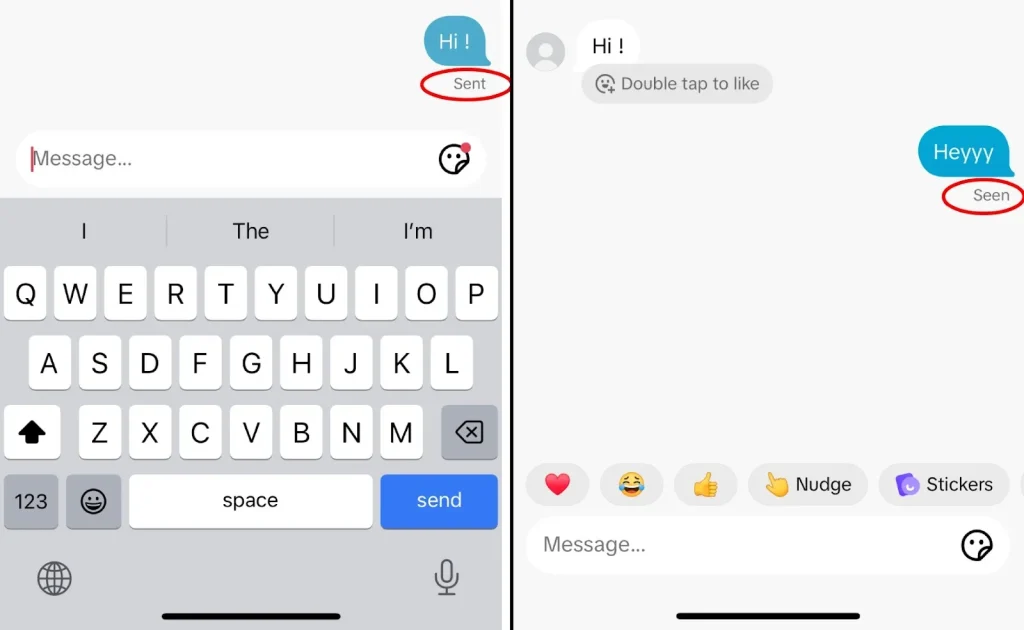
You can tell if someone read your message on TikTok by checking if there’s a little sign under your message that says ‘Seen’.
When you send someone a message on TikTok, you can see a little sign under your message that says ‘Sent’, and when the other person opens your messages, it will turn into ‘Seen’. Here’s a picture for better understanding:
Final Thoughts
Now you know every way to message someone on TikTok. As you read, you know that TikTok has strict rules to protect people’s privacy and safety. Make sure to always respect the rules and maintain a safe environment.
FAQs
Now let’s answer some frequently asked questions:
Q1: How Do You DM Someone on TikTok?
To DM someone on TikTok, tap the inbox icon at the bottom of the screen, then tap the plus sign (+) to start a new message. Search for the user you want to message, select their profile, and type your message.
Q2: How Do I Change My Message Privacy Settings to Receive Messages from Everyone?
To change your message privacy settings:
- Go to your profile and tap on the three stacked lines to access ‘Settings and Privacy’.
- Tap on ‘Privacy’ and then ‘Interactions’.
- Select ‘Messaging’ and choose ‘Everyone’ to allow messages from everyone.
Q3: Can You Message People on TikTok Under 16?
No, you can’t message people on TikTok under 16. TikTok’s privacy settings for users under 16 automatically set their accounts to private and restrict the ability to send messages. Only friends (mutual followers) can send messages to each other, and this is also subject to parental control settings.
Q4: Why Can’t I Message People on TikTok?
If you can’t message someone on TikTok, it could be because:
- They don’t follow you back.
- They have their privacy setting set to stop receiving messages from everyone.
- You or the other user are under 16.
Q5: How Do I Know If I Can Message a Particular Person?
You can check if a user has allowed messages from everyone by visiting their profile. If the ‘Message’ button is visible next to the ‘Follow’ button, you can send them a message. If not, they may have restricted their message settings.
Q6: How Do You Chat With Someone on TikTok?
Chatting on TikTok is similar to DMing. Go to your inbox at the bottom of the screen, start a new message, and select the user you want to chat with. You can then send text, emojis, and TikTok videos within the chat.
Q7: How Do I Turn on Messages on TikTok?
To turn on messages on TikTok, go to your profile, tap the three dots in the top right side of the screen to access settings, then tap ‘privacy.’ Under the ‘Interactions’ section, tap on ‘Direct Messages’, and choose who you’d like to receive messages from.
