


There are a lot of ways to boost engagement and get more views on TikTok. One of them is making a TikTok playlist. But so many people don’t know what it is or how to make a playlist on TikTok. This is because TikTok doesn’t offer this feature to everyone.
If you have noticed before, some famous TikTok creators have playlists on their profiles that show their best and multi-part videos. This feature was offered by TikTok to users in 2021, alongside other features like the TikTok scheduler.
If you’re one of the lucky guys who has achieved this feature, stay with me throughout this blog to find out how to use it!
Summary
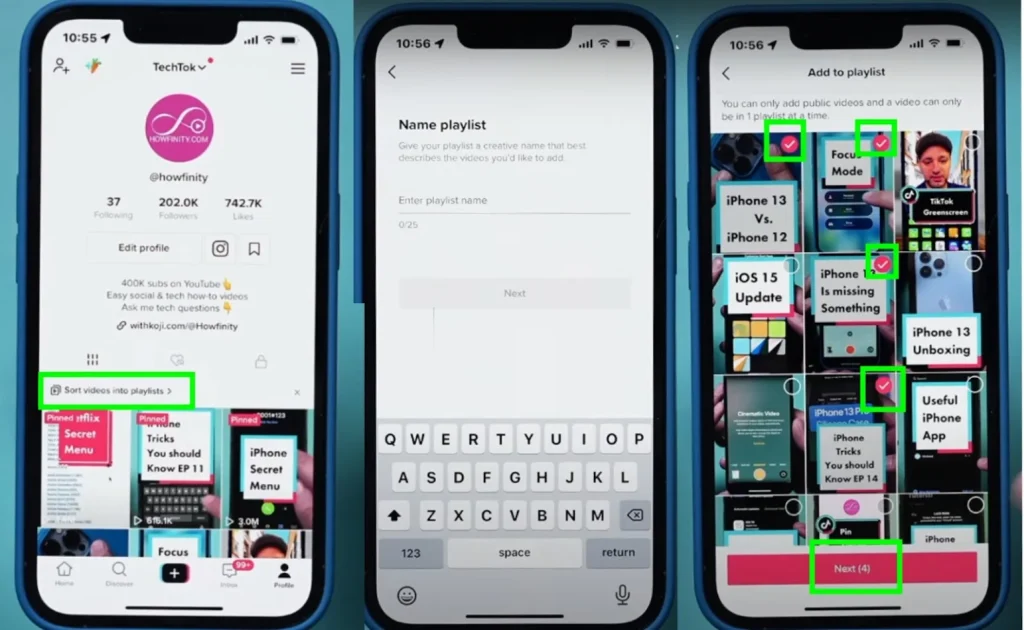
How to Make a Playlist on TikTok: profile page >> ‘Sort Your Videos into Playlists’ >> ‘Create a New Playlist’ >> Select the videos you want >> Name your playlist >> Arrange your videos
How to Add a Video to a Playlist Method 1: Profile page >> Long press on the video >> Select the option ‘Add to Playlist’ from the pop-up menu.
How to Add a Video to a Playlist Method 2: Profile page >> Open the video >> Three-dot icon >> Select ‘Add to Playlist’ from the menu.
What Is a TikTok Playlist and Who Can Make It?
On TikTok, some creators can organize their videos into playlists. These playlists group videos by category, making it easier for viewers to follow the videos and watch what they’re interested in. This feature is called TikTok playlist.
is a feature that allows creators to organize their videos into categorized sets for easier viewing by their audience.
Videos that are part of a playlist will have a link to the full playlist below the video. When viewers open a playlist, they can see all the videos featured, including titles, captions, and view counts. Viewers can also swipe through the video in a playlist, similar to how they would on the ‘For You’ page.
Making a playlist on TikTok can boost your views. Since viewers can watch one video after another in the playlist, they’re less likely to skip any of your content. because well, the chance that users will miss any of the videos in the playlist will drop low. A series of videos will be shown to users and if they are interesting enough, they will follow till the end. It kind of works like Twitter threads. And when this happens, you’ll get tons of free TikTok likes that can change your career path.
To this day, only creators who have more than 10,000 followers have access to the TikTok playlist. However, there are some reports that the TikTok playlist is activated for users with fewer followers, but some users with hundreds of thousands of followers still don’t have access to the feature. One of the users said the feature was activated for him once he reached 200k followers.
Both business and personal accounts can access this feature as soon as they meet the set followers.
How to Make a Playlist on TikTok
To create a playlist on TikTok, follow these steps:
- Go to your profile page and tap on ‘Sort Your Videos into Playlists’.

- Tap on ‘Create a New Playlist’.
- Name your playlist.
- Select the videos you want to add to your playlist (You can only add a video to one playlist, a video can’t be a part of two playlists together).
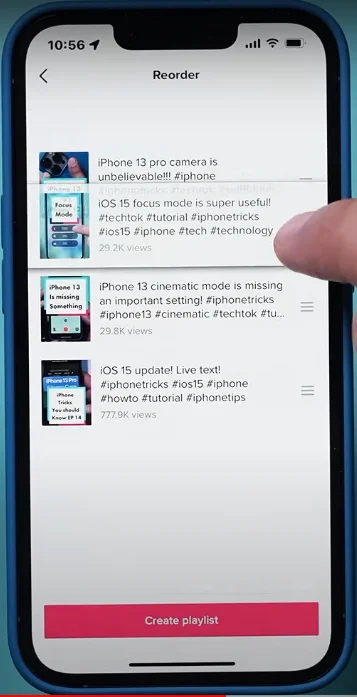
- Arrange your videos (you can reorder the videos in your playlist to select the sequence in which they will appear). For example, you can put the one with the most views on top.
How to Manage Your Playlist on TikTok?
Once you have created your TikTok playlist, you can change it in the future if you want. You can add or remove videos, you can also rename your playlist. Here’s how to do all of them:
- How to Add a Video to a TikTo Playlist
If you already have a playlist, here’s how you can add a video to it using two methods
- Tap and Hold: Go to your profile and find the video you want to add to a playlist. Long press on it. A pop-up menu will show up, and you will see the option ‘Add to Playlist’.
- Three-dot Menu: Go to your profile, look for the video you want to add to a playlist, and tap on it. You’ll see a three-dot icon at the bottom right side of your video, tap on it. Then, you’ll see the option ‘Add to Playlist’.

2. How to Remove a Video from a TikTok Playlist
Removing a video from a TikTok playlist is easy and similar to adding a video to your playlist. You need to follow the same steps:
Go to your profile, look for the video you want to add to a playlist, and tap on it. You’ll see a three-dot icon at the bottom right side of your video, tap on it. Then, you’ll see the option ‘Remove Form Playlist’.
3. How to Remove Multiple Videos from a TikTok Playlist
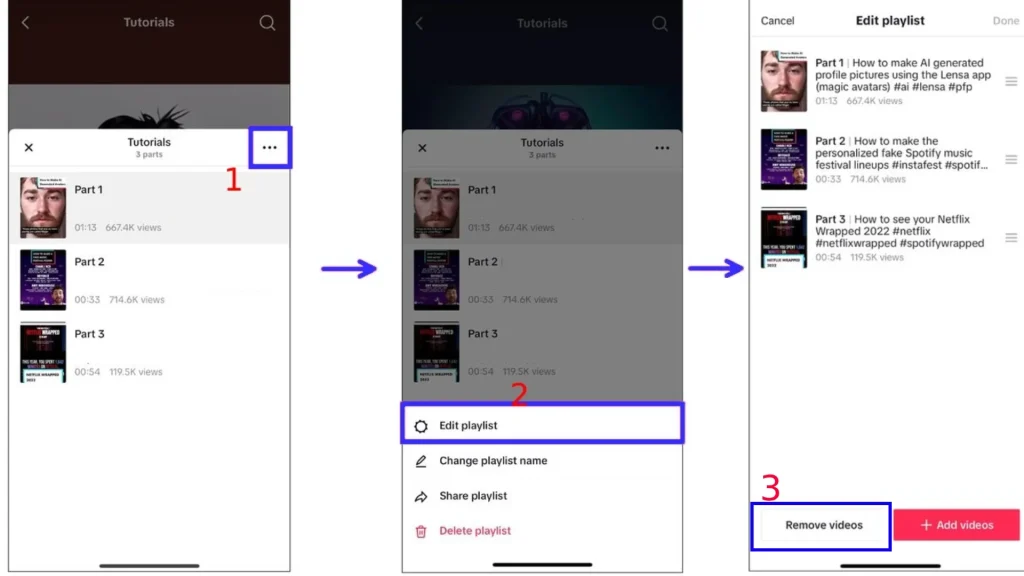
Go to your profile and select the playlist which you want to delete a video from. Then, select the three-dots icon on the top of the playlist and select ‘Edit Playlist’, and then ‘Remove Videos’. After that, select the videos you want to remove and tap ‘Done’.
4. How to Change a Playlist Name on TikTok?
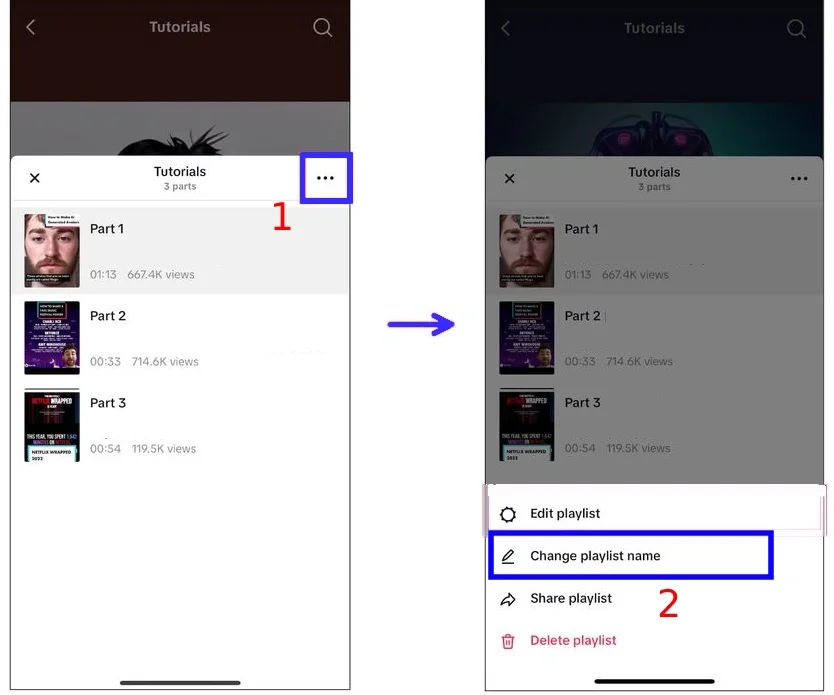
Go to your profile and select the playlist which you want to rename. Then, select the three-dots icon on the top of the playlist and select ‘Edit Playlist’, and then ‘Chane Playlist Name’. Write the name you want and tap ‘Done’.
5. How to Delete a Playlist from TikTok?
Go to your profile and select the playlist which you want to delete. Then, select the three-dots icon on the top of the playlist and tap on ‘Delete Playlist’.
FAQs
Now let’s answer some frequently asked questions on this topic:
Q1. Can I Edit My TikTok Playlist After Creating It?
Yes, you can add, remove, reorder, and rename your playlist and its videos.
Q2. Is There a Limit to How Many Playlists I Can Create on TikTok?
No, there are no limits on creating playlists on TikTok and you can add as many as you want.
Q3. How Can Viewers Find My Playlist on TikTok?
Viewers can find your TikTok playlist from your profile page. Videos that are part of a playlist will feature a link to the full playlist below the video.
Q4. If I Remove a Video From My Playlist, Will It Be Deleted From My Main Page Too?
No, if you remove a video from your playlist, users can still find it on your page or their for you page. You have just simply removed a video from a playlist, you haven’t deleted the whole video.
Final Thoughts
And that’s how you make and edit a playlist on TikTok! Playlists are not just a way to categorize your videos, they are a strategic tool to increase viewer engagement and time spent on your profile. You can guide your audience through your best content and make them interact with your account. This can lead you to a big success.
