


Has anyone ever been on your nerves, and you wanted to make them unfollow you because you didn’t want to upset them by unfollowing yourself? Can you make someone unfollow you on Instagram at all? In this blog post, I’m about to reveal all the ways to make someone unfollow you on Instagram with some simple tips.
Ready to find out more? Let’s get started.
Can You Make Someone Unfollow You On Instagram?
Yes, you can make someone unfollow you on Instagram. The platform allows you to control who can follow your account, view your content, and engage with you. If you want someone to unfollow you, you have a few options that I’m going to discuss in the following sections.
You may also like to learn bulk unfollow Instagram accounts.
1. Block The User
The first way to make someone unfollow you is by blocking them. When you block someone, they will no longer be able to follow you or see your posts. They will also be removed from your followers’ list. Moreover, they won’t be able to see your profile or interact with you on Instagram.
2. Remove Them As A Follower
Instagram provides an option to remove followers. If you have a public account or a private one, you can go to your followers’ list and remove the user you don’t want to follow you; this is how to make someone unfollow you on Instagram without blocking them.
Note: If you want to remove or mass unfollow users on Instagram, make sure to consider Instagram action limits.
3. Restrict The User
This method is a bit different because it doesn’t make them unfollow you, and you still have them on your followers’ list. However, you won’t see them anymore.
Instead of blocking or removing someone as a follower on Instagram, you have the option to restrict them. This feature was introduced in 2019 as part of Instagram’s efforts to combat bullying.
When you restrict someone on Instagram, their comments on your posts will be hidden from the public. They won’t receive notifications about your online status or whether you’ve read their messages. Essentially, it limits their interactions with your account.
Restricting someone acts as an anti-bullying measure, allowing you to control the interactions with individuals who may leave inappropriate comments on your posts. It’s a way to address the issue without completely blocking or unfollowing them.
There are various ways to restrict someone on Instagram, including restricting them from direct messages, comments, settings, or directly from their profile. If you choose to restrict someone from their profile, simply find the person, tap on the triple-dot icon in the top right corner of their profile, and select “Restrict.”
Remember that restricting someone doesn’t remove them as a follower, but it provides a practical solution for handling inappropriate comments.
How To Make Someone Unfollow You On Instagram?
One of the best ways to make someone unfollow you is by not interacting with their posts. (If you have ever wondered if someone can make you unfollow them on Instagram, this is the answer!)
If you stop liking or commenting on their content, they may lose interest in your account and unfollow you. Additionally, you can try to reduce the number of posts you make, so they don’t see your content as often.
Another way would be to ask them politely to unfollow you, but I don’t recommend this at all. I mean, why bother? Just remove them if they are getting on your nerves.
What Are The Steps To Remove A Follower On Instagram?
In the last part, we told you how you can make someone unfollow you on Instagram by removing them. And here, I’ll provide you with instructions on how to remove a follower on Instagram in a few steps:
- Open the Instagram app and navigate to your profile page.
- Tap on your followers list to see all of your followers.
- Find the follower you want to remove and tap on their name to go to their profile.
- Tap on the three dots icon (…) in the top right corner of their profile.
- Tap on “Remove Follower” from the menu that appears.
- Confirm that you want to remove the follower by tapping “Remove.”

So can someone make you unfollow them on Instagram? Yes! They can remove you the same way from their followers’ list.
What Happens When You Remove A Follower on Instagram?
When you remove a follower on Instagram:
- They won’t see your posts and updates.
- They can’t interact with your content.
- Previous direct messages are still visible.
- They don’t receive a notification when you post.
Also Read: Should I Unfollow My Ex on Instagram?
How To Unfollow Someone On Instagram Without Them Knowing
If you want to unfollow someone on Instagram without them knowing, you can mute their posts and stories instead and no longer see the content they post.
When you mute someone, their posts and stories will no longer appear in your feed, but they will still be able to follow you. Here’s how to mute someone on Instagram:
- Go to the profile of the person you want to mute.
- Tap the three dots icon (…) in the top right corner of their profile.
- Tap “Mute.”
- Choose whether you want to mute their posts, their stories, or both.
- Tap “Mute” to confirm.

Can You Hide Your Instagram Account From Specific Followers?
If you want to hide your Instagram account from specific followers, you can block them or make your account private. When you block someone, they cannot see your posts, stories, or follow you.
If you make your account private, only people you approve can follow you and see your content. Here’s how to make your Instagram account private:
- Open the Instagram app and navigate to your profile page.
- Tap on the three lines icon in the top right corner of the screen.
- Tap “Settings and privacy”
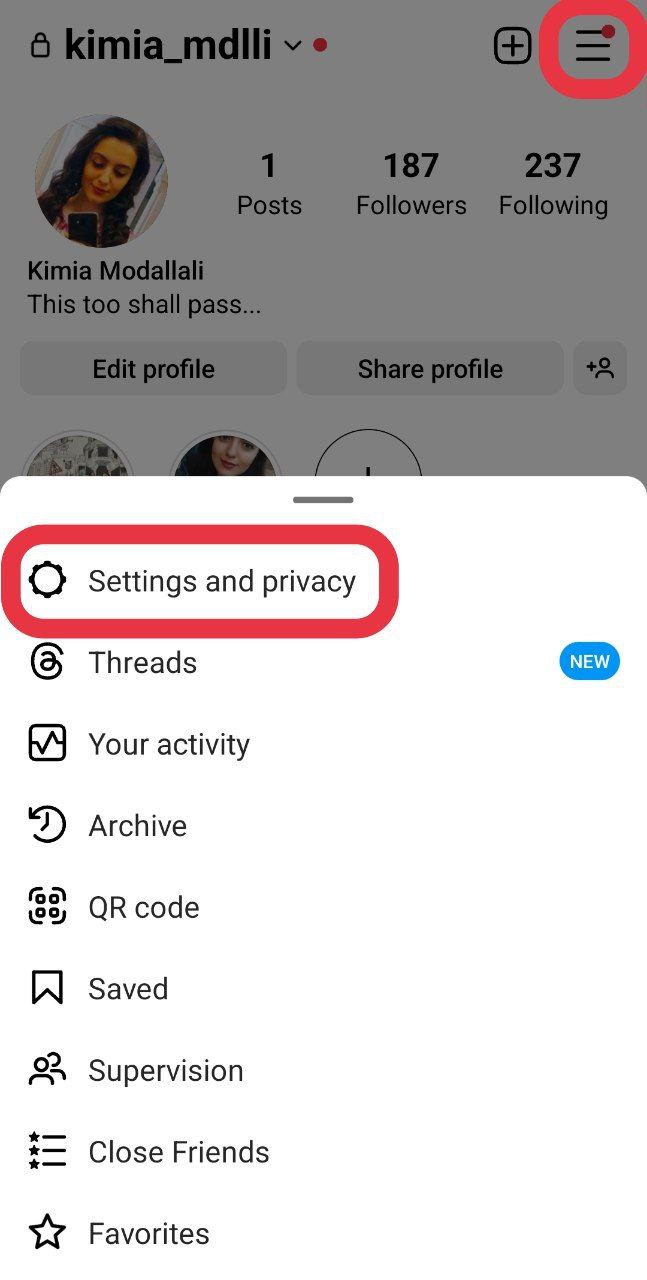
- Tap “Account privacy.”

- Toggle on “Private Account.”

Hide Instagram Stories
Another option you have is to hide as many users as you want from viewing your stories. Here are the steps to hide someone from your Instagram stories:
- Open the Instagram app: First, open the Instagram app on your mobile device and log in to your account.
- Go to your profile: Tap on your profile picture in the bottom right corner of the screen to go to your profile.
- Access your story settings: Tap on the three horizontal lines in the top right corner of the screen to access your Instagram settings. Then, tap on “Settings and privacy.”
- Add people to the Hide Story list: Under “Who can see your content,” tap on “Hide story and live.”

- And then, search for the person you want to hide from your Instagram stories by tapping “Hide story and live from.”

- Tap on their name to add them to the list.

Is It Possible To Prevent Someone From Following You on Instagram?
If you don’t want someone to follow you on Instagram, you can block them or make your account private. When you block someone, they cannot see your profile, posts, or stories or follow you. If you make your account private, only people you approve can follow you and see your content.
Also Read: How to Unfollow Hashtags on Instagram?
What Happens When You Block Someone on Instagram?
If you ask me, I can say the best thing about blocking someone is the satisfying feeling you have after getting rid of a pain in the neck. Anyway, when you block someone on Instagram, they cannot see your posts, stories, or profile and cannot follow you.
Additionally, they won’t be able to find your profile on Instagram, and any comments or likes they’ve left on your posts will disappear.
They will not be notified that you’ve blocked them, but they will know they’ve been blocked if they try to visit your profile.
How to Deal With Unwanted Instagram Followers
Sometimes, you may find that someone you don’t want following you has started following your Instagram account. In this case, there are a few steps you can take to deal with the situation:
- Block the follower: If someone makes you uncomfortable or you simply don’t want them following you, you can block them. Blocking will prevent them from seeing your posts or profile, and they will no longer be able to follow you.
- Remove the follower: If you don’t want to block the follower, you can remove them from your list of followers. To do this, go to your list of followers and tap the three dots next to the follower’s name. Then, select “Remove Follower.” This will remove them from your list of followers, but they will still be able to see your posts.
- Make your account private: If you’re getting unwanted followers, you can make your account private. This means that only people you approve as followers can see your posts and profile. To make your account private, go to your profile and tap the three lines in the top right corner. Then, select “Settings and privacy.” Then, tap “Account privacy” and toggle on the “Private Account” option.
How To Maintain Privacy On Instagram
Many of us care a lot about our privacy on Instagram. We don’t want strangers to see our personal info or our posts and profile, right? So, here are some tips for maintaining privacy on Instagram:
- Make your account private: As mentioned above, making your account private is a great way to keep your privacy on Instagram. This means that only people you approve as followers can see your posts and profile.
- Be careful with what you post: When posting on Instagram, remember the information you’re sharing. Avoid sharing personal information like your phone number or address, and be cautious when sharing photos or videos that reveal your location.
- Use strong passwords: Using a strong password for your Instagram account is an important step in maintaining privacy. Use a unique password that includes a mix of letters, numbers, and symbols, and avoid using the same password for multiple accounts.
Instagram Unfollowing Etiquette For Maintaining Relationships
Unfollowing someone on Instagram can be a sensitive topic, especially if the person is a friend or family member. I mean, think about it. You, all of a sudden, decide to end a relationship and you really expect a normal reaction? So here, I’ve gathered some tips for when you want to unfollow people on Instagram while maintaining a positive relationship:
- Be honest: If you no longer want to follow someone on Instagram, it’s best to be honest with them. You can explain that you’re trying to limit your social media use or that you’re trying to focus on other things in your life. (I don’t think they’ll buy your words, but give it a try 😁)
- Don’t take it personally: If someone unfollows you on Instagram, try not to take it personally. Remember that people have different reasons for using social media, and it’s not a reflection of your relationship with them.
- Stay connected in other ways: If you’re unfollowing someone on Instagram, try to stay connected with them in other ways. You can reach out via text, phone call, or in person to catch up and maintain your relationship outside of social media.
How To Tell If Someone Removed You As A Follower on Instagram?
Unfortunately, Instagram does not provide a specific notification or feature to inform you if someone has removed you as a follower. However, there are a few indications that may suggest someone has unfollowed you on Instagram:
- Inability to View Their Content: If you were previously able to view a specific user’s posts, stories, or comments, but suddenly cannot access their content, it might suggest that they have unfollowed you or changed their account’s privacy settings.
- Lack of Interactions: If you no longer see likes, comments, or engagement from a particular user who used to interact with your content frequently, it could imply that they have unfollowed you.
- Third-Party Tools: There are external tools and apps that claim to provide insights into who has unfollowed you on Instagram. These tools generally require access to your account and may not always be reliable or endorsed by Instagram.
How Do You Unfriend Someone On Instagram Without Them Knowing?
On Instagram, there is no direct option to unfriend someone as on other social media platforms like Facebook. However, you can remove someone from your followers without notifying them directly.
Conclusion
In short, Instagram doesn’t have a simple way to make someone unfollow you without blocking them. But you can try some tricks to get rid of them. Like making your account private, removing them manually, posting less, and ignoring their stuff.
Anyway, you must remember these tricks don’t always work, and some people may still stick around even if they don’t care about your content.
FAQs
Now that you know how to make someone unfollow you on Instagram, it’s time to answer some frequently asked questions.
1. If Someone Unfollowed Me on Instagram, Do I Automatically Unfollow Them?
No, you do not automatically unfollow them. Unfollowing someone on Instagram is a one-way action. That means the other person can still see your posts and stories, unless you block them or make your account private. If you want to stop following them, you need to unfollow them manually.
2. Can You Remove Multiple Followers on Instagram?
Instagram doesn’t let you unfollow a bunch of people at once. But you can use their “Least Interacted With” thing to unfollow some of them. Or you can try some other apps that say they can help, but be careful not to break Instagram’s rules.
