


When it comes to breaking the boundaries of social media platforms and accessing exclusive content without any restrictions, no platform can beat OnlyFans. This popular yet controversial website has something for everyone, regardless of their interests and tastes. You just have to know how to do OnlyFans search properly!
With almost 2 million content creators on the platform, knowing how to find someone on OnlyFans is a necessity, especially if you’re looking for a specific creator. Nevertheless, OnlyFans creators are known for their discretion, and finding them can be a struggle if you don’t have the right tricks up your sleeve.
To help you on your journey to find the hottest content you can imagine, we’re going to guide you through OnlyFans search methods, introducing you to the most effective ways to search OnlyFans creators for your next pleasurable experience!
How to Find Someone on OnlyFans
Finding a particular creator on OnlyFans is not as straightforward as you might think, especially if you don’t know their exact username. But worry not! There are a few methods that allow you to search OnlyFans and find your person based on name, location, and even keywords such as black OnlyFans, femdom OF creators, and more!
Let’s take a closer look at how you can do so:
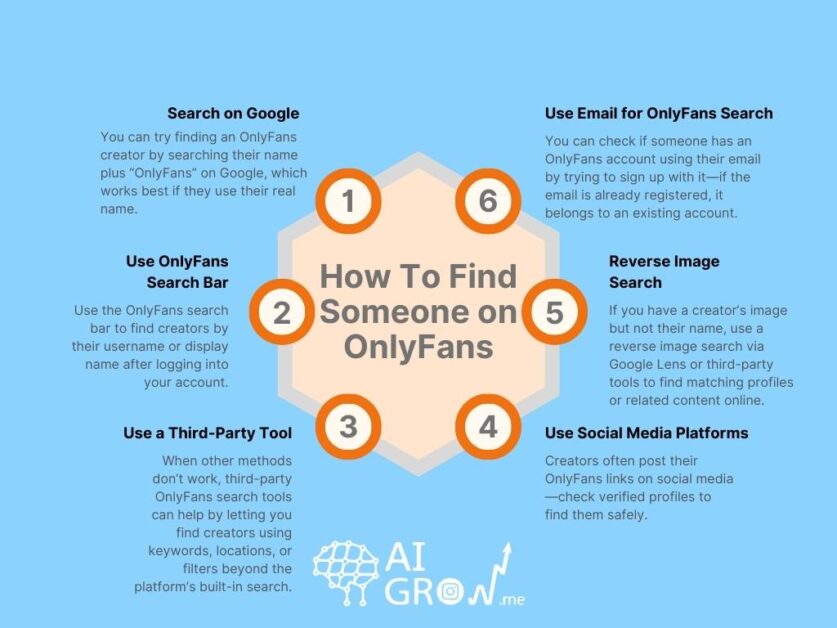
#1 Search on Google
As with every other question we face in our everyday lives, Google provides us with an answer when it comes to OnlyFans search. However, it’s important to note that this method is only effective if the person you’re looking for is using their real name on OnlyFans. Otherwise, Google might not be the best place to look for them. Nevertheless, it’s worth a shot!
To perform an OnlyFans lookup on Google, follow these steps:
- Open your web browser and go to the Google homepage.
- In the search bar, type in the name of the creator you’re trying to find on OnlyFans, followed by ‘OnlyFans’.
- Press Enter or click on the Search button to initiate the search.
- Review the search results. Look specifically for any OnlyFans profile links or mentions related to the person you’re searching for.
- Click on the relevant search result that appears to be associated with the creator’s OnlyFans profile.
- If you’re directed to a specific profile page on OnlyFans, you may need to sign up or log in to access the content, depending on the creator’s privacy settings.

#2 Use OnlyFans Search Bar
When you want to find someone on OnlyFans, it’s only natural to consider the platform itself as the first place to look. OnlyFans has its own built-in search feature that allows you to search for creators based on their usernames or display names. So if you know this data, wait no more! Hop on OnlyFans and find your desired creator easily.
Here’s how to use OnlyFans search bar:
- Navigate to the OnlyFans website on your browser.
- Login to your account or create a new one if you haven’t already.
- Once logged in, locate the OnlyFans search bar at the top of the screen.
- Type in the username or display name of the creator you want to find.
- Hit Enter or tap on the search icon.
- Browse through the search results to find the specific creator’s profile.
- Click on the profile to view more details and subscribe if you’re interested.

Using the OnlyFans search bar is one of the most direct and effective ways to find someone on the platform, especially if you already have the creator’s username or display name in mind.
#3 Use a Third-Party Tool
When all the other methods fail, it’s time to use a third-party tool for OnlyFans search! These services are great for expanding your search capabilities beyond what’s available directly on the OnlyFans platform. OnlyFans search engines can offer advanced search functionalities, such as searching by location, keywords, or even filtering based on specific content categories.
Here’s how you can use a third-party tool to find someone on OnlyFans:
- Choose a Reputable Tool: Start by selecting a trustworthy third-party tool designed for searching OnlyFans. Look for reviews and recommendations to ensure it’s reliable and safe to use.
- Enter Search Criteria: Once you’ve chosen a tool, navigate to its website or platform. You’ll typically find a search bar or advanced search options where you can input the criteria you’re looking for. This might include keywords, usernames, location, or other specific details. If you don’t have a particular creator in mind, just search by keywords such as ‘Blonde OnlyFans’ or ‘Latina OnlyFans’ to uncover a feast of spicy content!
- Review Search Results: After entering your search criteria, the tool will generate a list of relevant profiles or content matching your query. Take your time to review these results and find the creator you’re interested in!
- Access Profiles: Click on the profiles or links provided in the search results to visit the OnlyFans profiles directly. Depending on the tool and its integration, you might be able to access certain details or previews without needing to log in.
- Subscribe or Interact: If you find the desired creator through the third-party tool, you can then go to their OnlyFans profile to subscribe or interact further, depending on your interests.
Using a third-party tool is a great method when it comes to learning how to search for people on OnlyFans. Their advanced features and functional search engines can significantly enhance your ability to locate specific creators or discover new content on OnlyFans.
#4 Use Social Media Platforms
Social media platforms such as Instagram, TikTok, and YouTube have strict guidelines when it comes to sharing nude or intimate content. Creators can’t share explicit content directly on these platforms as they might be banned or reported.
However, due to the lack of a proper search function on OnlyFans itself, many creators and celebrity OnlyFans models share their OF usernames directly on their social media profiles, allowing their followers and fans to find their accounts easily and effortlessly.
So, if you’re looking for a specific creator on OnlyFans, make sure to check their social media profiles for any mentions or direct links to their account.
Pro Tip: if the creator you’re looking for is a well-known figure, make sure to check out their verified accounts and not fall for any fake profiles or scams.
#5 Reverse Image Search
If you have an image of the creator you’re trying to find but don’t know their name or username, a reverse image search can be a valuable tool. This method allows you to upload an image or paste its URL to find similar images or related content across the web. Here’s how you can perform a reverse image search:
Using Google Lens
- Open Google on your web browser.
- Click the camera icon in the search bar to initiate a reverse image search using Google Lens.
- You can either upload the image file directly or paste the URL of the image.
- After uploading or pasting the image URL, click on the ‘Search’ button.
- Review the search results to see if the image matches any profiles or content related to OnlyFans.

Using Third-Party Reverse Image Search Tools
- There are several third-party reverse image search tools available online, such as Social Catfish.
- Visit the website of your preferred reverse image search tool.
- Follow the instructions provided to upload the image or paste its URL.
- Wait for the tool to process the image and generate search results.
#6 Use Email for OnlyFans Search
If you have the email address of the creator you’re trying to find, you can use it to conduct an OnlyFans search. However, OnlyFans doesn’t share the email address of the creators publicly due to its privacy policy, and users can sign up on the platform with different emails, so the results might not be accurate. So how can you do an Onlyfans search by email?
Well, first you should know that this method doesn’t lead you to the person’s OnlyFans account. You can, however, determine whether they have an Onlyfans account with that specific email. Here’s how you can do that:
- Open the OnlyFans website on your mobile phone or computer.
- Click on ‘sign up for OnlyFans’.

- Choose a random name, write down the email address of the person you’re trying to find, and select a password. Then, click on ‘Sign Up’.

- If the email you’re signing up with is already associated with an OnlyFans account, you’ll see an error that says: ‘This email is already registered with OnlyFans’. This means that the person you’re trying to find has an Onlyfans account.

- If, however, the email you’re trying to sign up with is not associated with an Onlyfans account, then the signup process will continue without any errors. This means that the person you’re looking for doesn’t have an OnlyFans account, at least not with the email you have. They might still have an account with another email. So, make sure to use the other Onlyfans lookup methods, too.
FAQs
In this guide, we’ve covered several effective methods for conducting an OnlyFans search to find specific creators or content on the platform. Here are some frequently asked questions about this matter:
Q1. Is OnlyFans Anonymous?
Yes, OnlyFans is a completely anonymous platform. It prioritizes user privacy and allows creators to control who can access their content. Users are only able to see the creator’s username and profile picture.
Q2. Can You Search for an OnlyFans?
Yes, you can search for creators and content on OnlyFans using various methods. The platform itself offers a built-in search bar where you can enter usernames or display names to find specific creators. Additionally, third-party tools and search engines like Google can be used to locate creators based on name, location, or other criteria.
Q3. How Do Fans Find You on OnlyFans?
Fans can find creators on OnlyFans through several avenues, including direct search, social media, word of mouth, and third-party tools. Users can also search OnlyFans by location, keyword, category, and other criteria using third-party tools.
Final Words About OnlyFans Search
Finding your favorite creators on OnlyFans can be both exciting and challenging, and by using the methods highlighted in this guide, your journey is more enjoyable than ever!
Each method has its strengths depending on the information you have about the creator you’re looking for. Whether you’re searching by username, display name, or other identifiers, these strategies will help you find what you’re looking for. there
 Summarize this article with:





