

TikTok and Instagram are almost becoming one. Everything that is posted on Tiktok will be posted on Instagram within hours. This is why you need to know how to add your Instagram to TikTok.
Doesn’t matter if you use an iPhone, Android, or PC. In this blog, I’ll teach you how to link Instagram to TikTok in 2024 and allow viewers to easily discover your presence on both platforms.
How to Add Your Instagram to TikTok on iPhone and Android
Adding your IG to Tiktok has the same method both in Android and iPhone. Here is how to do it in both of them:
- Open TikTok: Launch the TikTok app on your iPhone or Android device.
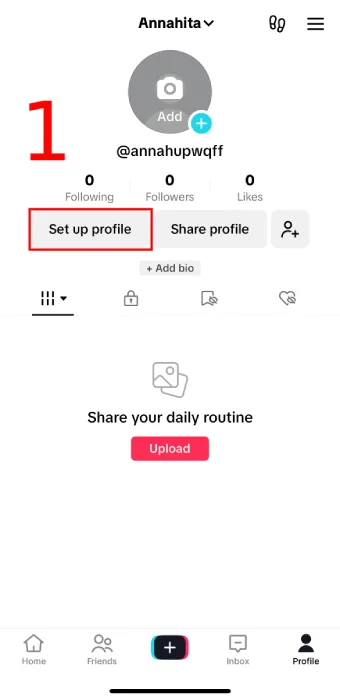
- Access Your Profile: Tap on the “Me” icon located at the bottom right corner of the screen. This will take you to your profile page.
- Edit Your Profile: Once you’re on your profile page, tap on the “Edit Profile” option. This will allow you to access your profile settings.
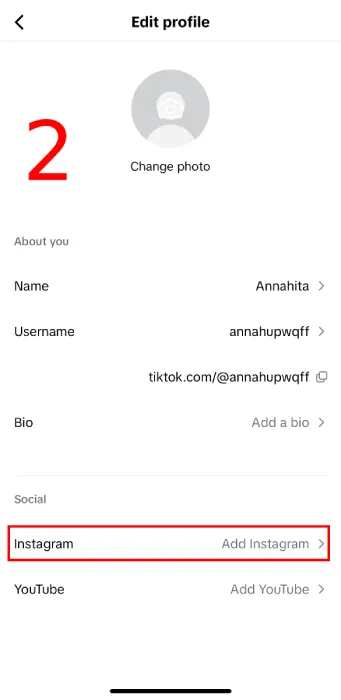
- Add Instagram: Scroll down to the bio section of your profile. You’ll find an option labeled “Instagram.” Tap on it.
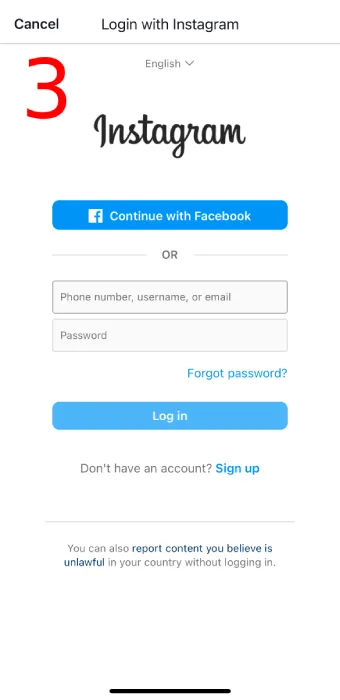
- Sign In: TikTok will prompt you to sign in to your Instagram account. Enter your login details (username and password), and verify if needed.
- Done!: Your Instagram account will now be linked to your TikTok profile.
Read more: Is It Easier to Grow on Tiktok or Instagram?
How to Add Instagram to TikTok Business Account
Adding your IG to your Tiktok business account has no difference from adding it to a normal account. The instruction is the same as above, here is a summary:
- Log in to TikTok
- Access Your Profile: Tap on the “Me” icon located at the bottom right corner of the screen.
- Edit Your Profile: On your profile page, tap on the “Edit Profile” option.
- Add Instagram: Scroll down till you find an option labeled “Instagram.” Tap on it.
- Sign In: Sign in to your Instagram account. Enter your Instagram login details (username and password), and verify if needed.
How to Link Instagram to TikTok on Desktop
TikTok has the same function both on phones and desktops. So the method of adding your IG to it is the same. Here is a short brief:
- Open TikTok on your web browser and log in to your account.
- Click on your profile picture in the top right corner.
- Select “Edit profile”.
- In the bio section, you can paste your Instagram profile URL. You can find your profile URL by copying the link from your Instagram app or browser.
You might also like: Deciding Between TikTok Ads and Facebook Ads in 2024
How to Add Instagram Link to TikTok bio
Adding a link to your Instagram profile in your TikTok bio is a great way to cross-promote your content and increase your reach across both platforms. Follow these steps to do it in less than a minute:
- Check Your Account Type:
- Before adding any links, ensure that you have a business account on TikTok with more than 1,000 followers. The link-in-bio feature is exclusive to business accounts.
- Access Your TikTok Profile:
- Open the TikTok app on your mobile device.
- Tap on the “Me” icon at the bottom right of the screen to go to your profile.
- Edit Your Profile:
- On your profile page, tap on “Edit Profile.”
- Add Your Instagram Link:
- Scroll down to the bio section.
- Look for the “Instagram” option and tap on it.
- You’ll be prompted to sign in to your Instagram account.
- Enter your Instagram login details (username and password) and verify if needed.
- Save Changes:
- Once connected, your Instagram account will be linked to your TikTok profile.
- Now you can share your TikTok videos directly on Instagram and enhance your presence on both platforms.
How to Post on Instagram and TikTok at the Same Time
There are 3 ways to post on TikTok and IG at the same time, here they are:
- Resharing Content
Resharing existing videos is an efficient way to cross-promote your content. Start by creating videos using your device’s camera (rather than directly within the Instagram or TikTok apps) to avoid watermarks and ensure better editing flexibility1.
If you’re already established on TikTok, consider resharing your TikTok videos on Instagram Reels. TikTok’s editing suite is user-friendly and allows you to create short-form content directly within the app1.
Conversely, you can also reshare Reels on TikTok if relevant. Keep in mind that Instagram is increasingly pushing users toward video content, so leveraging Reels can be beneficial.
- Linking TikTok and Instagram
- To link your TikTok account with Instagram, follow these steps:
- Open TikTok and tap the “+” icon to create a new video.
- Record a video or upload one from your gallery.
- After editing the video, tap “Next.”
- In the “Who can view this video” section, select “Public.”
- Tap on the Instagram icon and then tap “Post.” This will redirect you to Instagram, where you’ll see options to share the video to your feed or stories.
- To link your TikTok account with Instagram, follow these steps:
- Using Social Media Scheduling Tools
- Tools like OneUp allow you to schedule posts for TikTok, Instagram Reels, and YouTube Shorts simultaneously. These tools simplify the process and ensure consistent sharing across platforms
Also read: How to Drive Traffic from TikTok to Your Site
Why Won’t TikTok Let Me Link My Instagram?
There might be some glitches sometimes, but there’s nothing that can’t be fixed. Try these solutions:
- Clear TikTok Cache: Accumulated cache data might cause issues. Try clearing the TikTok app’s cache to refresh it and remove any errors or process failures that may have occurred.
- Reinstall TikTok: Delete the TikTok app from your device and reinstall it. After reinstalling, log in again and attempt to link your Instagram account.
- Check for Updates: Make sure you’re using the latest version of TikTok. Head to the Google Play Store (for Android) or the App Store (for iOS) to check for updates. An available update could potentially fix the problem.
- Manually Input Instagram Account: If the Instagram button isn’t working, try manually adding your Instagram account via a link in TikTok’s “website” section
Final Thoughts
In conclusion, with just a few taps on the mobile app, you can link your Instagram profile to your TikTok bio. This strategic move can significantly boost your reach and attract new followers across both platforms.
