


Errors and challenges are common things on social media. These tests are designed to protect users’ information and privacy.
But Instagram is not a kind of app to challenge you everyday, unless you’re doing some unusual activities and acting suspicious. This is where Instagram will be very strict.
If you are facing a challenge required error on Instagram, this means Instagam has its eyes on you and is watching you closely, not for anything bad, but for your own safety.
If you want to know what this error is, why it’s happening, and how ro resolve it, stay with me throughout this blog cause I’m going to tell you all about it!
What is the “Challenge Required” Error?
The “Challenge Required” error on Instagram is a security measure implemented by the platform to protect user accounts and maintain a secure online environment.
When users encounter this error, it indicates that Instagram has detected suspicious or potentially risky activity associated with the account.
This could include unusual login patterns, unauthorized access attempts, or behavior that violates Instagram’s community guidelines.
In essence, the platform prompts users to complete a challenge or verification process to prove that they are the legitimate account owner and not a potential threat.
This security feature is crucial for safeguarding user accounts and preventing unauthorized access or malicious activities, contributing to a safer and more trustworthy Instagram community.

Reasons for “Challenge Required” Error on Instagram
The “Challenge Required” error on Instagram can occur due to various reasons related to account security and user activity. Here are some common reasons behind this error:
Unusual Login Location
If a user attempts to log in from a location that is significantly different from their usual login locations, Instagram may trigger a challenge to confirm the legitimacy of the login.
Unrecognized Device
Logging in from a new device that hasn’t been associated with the Instagram account before might trigger a challenge. This is a common security measure to prevent unauthorized access.
Rapid Change in Activity
If there is a sudden and significant change in a user’s activity, such as a large number of follows, unfollows, or comments within a short period, Instagram might implement a challenge to ensure the account is not being used for spam or automated actions.
Unusual Posting Patterns
Posting a high volume of content in a short time or engaging in behavior that deviates from the user’s typical posting patterns may trigger a challenge, as it could be indicative of automated activity.
Read more:“We Restrict Certain Activity to protect our community” [6 ways to fix in 2023]
Repeated Incorrect Password Attempts
Users who repeatedly enter incorrect passwords may face a challenge as a security measure against potential unauthorized access. This helps protect the account from brute-force attacks.
Reported Account
If an account is reported for suspicious activity or a violation of community guidelines, Instagram may implement a challenge to investigate and verify the reported issues.
Login Attempts from Different Locations in Quick Succession
Rapid login attempts from different geographic locations within a short timeframe may trigger a challenge. This could be a sign of unauthorized access attempts.
High Volume of Account Recovery Requests
If there are numerous requests for account recovery within a short period, Instagram may implement challenges to ensure that the person attempting to recover the account is the legitimate account owner.
Suspicious Behavior
Instagram’s algorithms may detect behavior that appears suspicious or violates the platform’s community guidelines. This could include aggressive following and unfollowing, spammy comments, or other activities indicative of automated or malicious behavior.
Account Compromise Concerns
If Instagram has reason to believe that an account may have been compromised or is at risk, it may require the user to complete a challenge as an added security measure.
Usage of Automation or Third-Party Apps
Engaging in automated actions or using third-party apps that violate Instagram’s policies can trigger the “Challenge Required” error, as these activities are often associated with spam or misuse.
Violations of Community Guidelines
Users engaging in activities that go against Instagram’s community guidelines, such as posting inappropriate content or engaging in harassment, may face a challenge as a response to their actions.
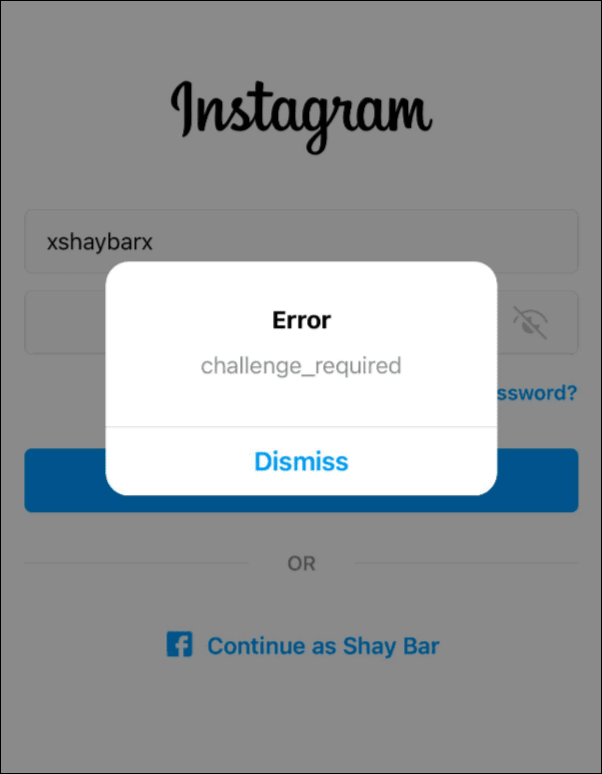
Types of Challenges on Instagram
On Instagram, users may encounter different types of challenges that can trigger the “Challenge Required” error. These challenges serve as additional verification steps to ensure the security and legitimacy of user accounts. Here are some common types of challenges on Instagram:
Login Verification Challenge
In the login process, users may be required to complete additional steps to verify their identity. This could involve solving image-based puzzles, confirming account details, or responding to security prompts.
Two-Factor Authentication (2FA)
Instagram encourages users to enable two-factor authentication as an added layer of security. In some cases, the platform may enforce a challenge to ensure that users have set up and can successfully complete the 2FA process.
Photo or Image Recognition Challenge
Users might be asked to identify specific objects or elements in images to prove that they are human and not a bot attempting unauthorized access. This challenge often involves selecting specific items from a set of images.
Email or Phone Number Verification
Instagram may request users to verify their email address or phone number associated with the account. This can involve sending a verification code via email or SMS to confirm the user’s identity.
ReCAPTCHA Challenges
Instagram may utilize Google’s reCAPTCHA to differentiate between human and automated activities. Users might encounter challenges where they need to click on checkboxes, solve puzzles, or perform other tasks to prove they are not bots.
Review of Recent Activity
Sometimes, users may be prompted to review recent account activity to identify any suspicious actions. This could include verifying recent logins, password changes, or other account modifications.
Behavioral Challenges
Instagram’s algorithms may analyze user behavior, such as liking patterns, comments, and follows. If the system detects unusual or potentially automated behavior, it may trigger a challenge to verify the authenticity of the account.
Overview of the challenges users might face
Here is an overview of the challenges users might face on challenge required instagram error:
Login Challenges
Users may be prompted to complete additional verification steps during the login process. This can include solving puzzles, identifying objects in images, or confirming account details to ensure the legitimacy of the login attempt.
Verification Codes
Instagram may send verification codes via email or SMS to the user’s registered email address or phone number. Users must enter these codes to confirm their identity and gain access to their accounts.
Image Recognition Challenges
Users might be presented with challenges that involve recognizing specific elements in images, such as selecting all photos containing a particular object. This helps verify that the user is a human rather than an automated bot.
Suspicious Activity Review
Instagram may ask users to review recent account activity to identify and confirm any suspicious actions. This could include verifying logins, password changes, or account modifications.
Two-Factor Authentication (2FA)
Users may encounter challenges related to setting up or using two-factor authentication. Instagram encourages the use of 2FA as an additional security layer to protect accounts from unauthorized access.

ReCAPTCHA Challenges
To distinguish between human users and automated bots, Instagram may implement reCAPTCHA challenges. Users may need to complete tasks like clicking checkboxes or solving puzzles to prove they are not bots.
Behavioral Analysis Challenges
Instagram’s algorithms may analyze user behavior, looking for patterns that suggest automated or suspicious activity. If such patterns are detected, users may face challenges to confirm their authenticity.
Account Recovery Challenges
Users attempting to recover a compromised account may encounter challenges to verify their identity. This can involve providing additional information or undergoing a multi-step verification process.
Challenge Required Instagram Solution
Here are ways to resolve challenge required instagram error:
Read and Understand the Challenge Message
Carefully read the information provided in the “Challenge Required” message. It may include details about why the challenge is necessary and the specific steps you need to take.
Follow the On-Screen Instructions
Instagram typically provides on-screen instructions to guide you through the challenge. Follow these instructions precisely to complete the required verification steps.
Complete Image Recognition Challenges
If the challenge involves image recognition, carefully examine the provided images and follow the instructions to select the specified objects. This helps prove that you are a human user.
Enter Verification Codes
If Instagram sends a verification code to your registered email address or phone number, enter the code as instructed. This verifies that you have access to the associated email or phone account.
Confirm Account Details
In some cases, you may be asked to confirm specific details about your Instagram account, such as your username, email address, or phone number. Provide accurate information to validate your account ownership.
Complete Two-Factor Authentication (2FA) Steps
If you have enabled 2FA on your account, follow the steps to complete the authentication process. This may involve entering a code sent to your 2FA method, such as an authentication app or SMS.
Review Recent Activity
If the challenge requires you to review recent account activity, check for any unfamiliar actions. Confirm or dispute these activities as instructed to ensure the security of your account.
Change Password if Necessary
As an additional security measure, consider changing your password after completing the challenge. This helps prevent unauthorized access and secures your account.
Check for Account Compromises
In case you suspect your account may have been compromised, take additional steps to secure it, such as reviewing connected apps, revoking access to third-party services, and updating security settings.
Contact Instagram Support if Issues Persist
If you encounter difficulties or if the challenge persists despite following the instructions, reach out to Instagram support for further assistance. Visit the Instagram Help Center or use the in-app support options to get in touch with their support team.
FAQs
Now let’s answer some frequently asked questions on this subject:
Why does it say “Challenge Required” on Instagram?
Instagram displays this message as a security measure to verify user identity and protect against suspicious activity or potential account compromise.
Why Does Instagram Challenge Required Error Wants My Phone Number?
Instagram may request phone number verification as part of a challenge to enhance account security.
How do you fix the “Challenge Required” on Instagram?
Resolve the challenge by following on-screen instructions, completing verification steps (e.g., image recognition, 2FA), and confirming account details.
How do I fix “Consent Required” on Instagram?
To address “Consent Required” issues, review and accept any pending privacy or policy updates in your Instagram settings to comply with the platform’s terms.
How long does challenge required last on instagram?
It usually takes 24-48 hours till it goes away, try to not trigger the error in the meantime.
What does challenge required mean on Instagram when deleting account?
Instagram is trying to make sure that it is you who is deactivating/deleting the account.
Final Thoughts
In conclusion, the “Challenge Required” error on Instagram serves as a crucial guardian of account security.
This feature, though occasionally disruptive, is Instagram’s proactive measure against unauthorized access and suspicious activities.
By embracing the challenges and understanding the reasons behind them, users can fortify their online presence.
Vigilance, adherence to community guidelines, and timely resolution of challenges not only restore account access but also foster a safer digital environment.
In the ever-evolving landscape of social media, acknowledging and navigating the “Challenge Required” prompt empowers users to enjoy the benefits of Instagram with confidence and peace of mind.
