


Instagram Live is a great way to connect with your followers and share your thoughts and experiences in real time. However, sometimes the comments can be overwhelming or even inappropriate.
As a viewer or the person who is hosting the IG live, in this kind of situation, you may want to hide the comments. If you’re wondering how to hide comments on instagram live, stay with us throughout this blog to find out!
How to Hide comments when I’m live on Instagram?
To hide comments on Instagram Live, you can either:
Disable comments altogether
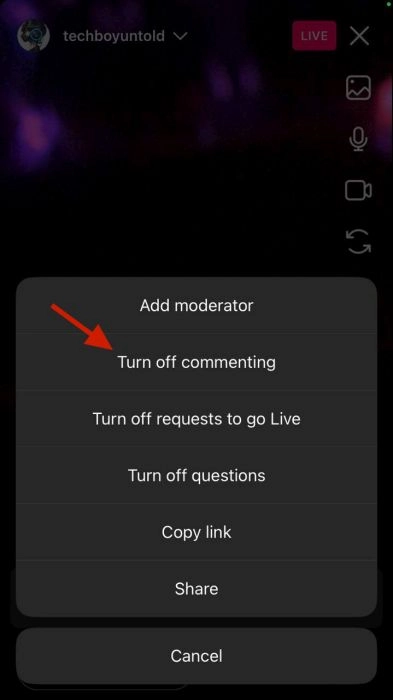
This is the easiest way to hide comments on Instagram Live, but it also means that viewers will not be able to comment on your live stream at all.

To disable comments, simply tap on the three-dot icon in the top right corner of the screen during your live broadcast and select “Turn Off Commenting.”
Hide individual comments
If you only want to hide certain comments, you can do so by swiping left on the comment you want to hide and tapping the “Hide” button. This will remove the comment from your view, but it will still be visible to other viewers.
Read more: Top 10 Instagram Live Ideas for Engagement in 2023
Additional Tips for Managing Comments on Instagram Live:
- Use keywords to filter comments: You can filter out comments that contain certain words or phrases by going to your Instagram profile settings and tapping on “Hidden Words.” Here, you can add keywords or phrases that you want Instagram to hide from your comments.
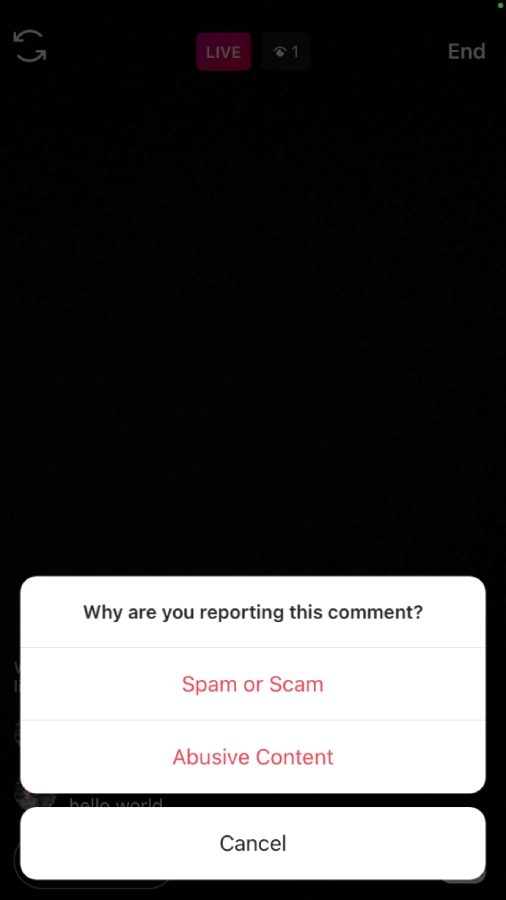
- Report inappropriate comments: If you see a comment that is inappropriate or violates Instagram’s Community Guidelines, you can report it by tapping on the three dots next to the comment and selecting “Report.”
- Ban users from commenting: If a user is repeatedly posting inappropriate comments, you can ban them from commenting on your live streams by tapping on their profile picture and selecting “Block.”
How to Hide Comments on instagram live as a viewer?
There is currently no way to hide comments on Instagram Live as a viewer. This is a decision that is made by the host of the live stream.
Instagram has said that they are working on a feature that would allow viewers to hide comments on live streams, but there is no timeline for when this feature will be released.
Read more: How to Unview Someone’s Story on Instagram? [Answer 2023]
FAQs
Now let’s answer some frequently asked questions on this subject:
Why can’t I hide comments on instagram live?
The feature to hide comments on IG Live is only available to the host of the live stream. Viewers cannot hide comments.
why are my comments off on instagram live
There are a few reasons why your comments might be off on Instagram Live:
- You disabled comments altogether.
- You are using a third-party app to broadcast your live stream that does not support comments.
- You have been banned from commenting on live streams
how to turn on comments when watching instagram live
You cannot turn on comments when watching Instagram Live. Only the host of the live stream can turn on or off comments.
Final Thoughts
In conclusion, there is currently no way to hide comments on Instagram Live as a viewer. This is a decision that is made by the host of the live stream.
However, there are a few things you can do as a viewer to manage the comments if you are concerned about them, such as reporting inappropriate comments and blocking users.
IG has said that they are working on a feature that would allow viewers to hide comments on live streams, but there is no timeline for when this feature will be released.
