


Instagram is all about connecting. Liking, commenting, messaging, and story replies – they’re all part of the interaction game. Even a comment you’ve left on someone’s post holds value in Instagram’s eyes and may help you spot like-minded people.
But how to see who liked your comment on Instagram? Is it possible to see who liked a comment on Instagram made by others? In this blog, we’ll drill down deeper into these questions. Let’s get started.
How to see who liked your comment on Instagram?
Thankfully, Instagram lets you find out your comments’ likes, and you’ll even get a notification if you want. Just turn the notifications on, how? Let’s dive in.
- Head to your Instagram profile and give the top three-line icon a tap.
- Go to “Setting and Privacy,” then tap on “Notifications.”
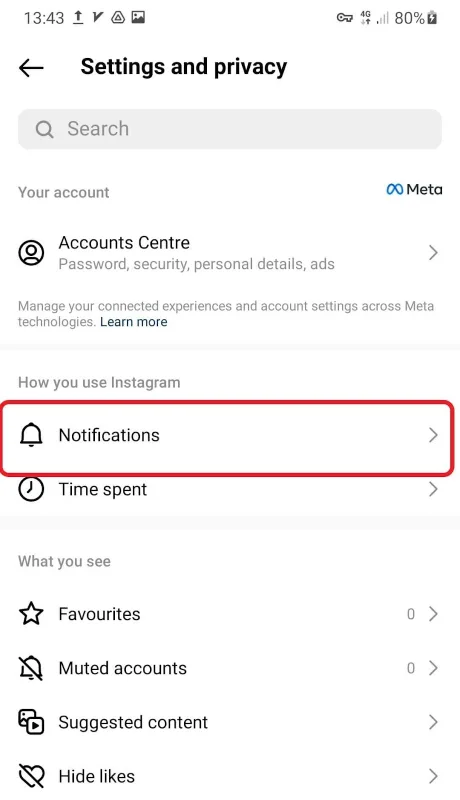
- Now, head over to “Stories, Posts, and Comments” and click on it.
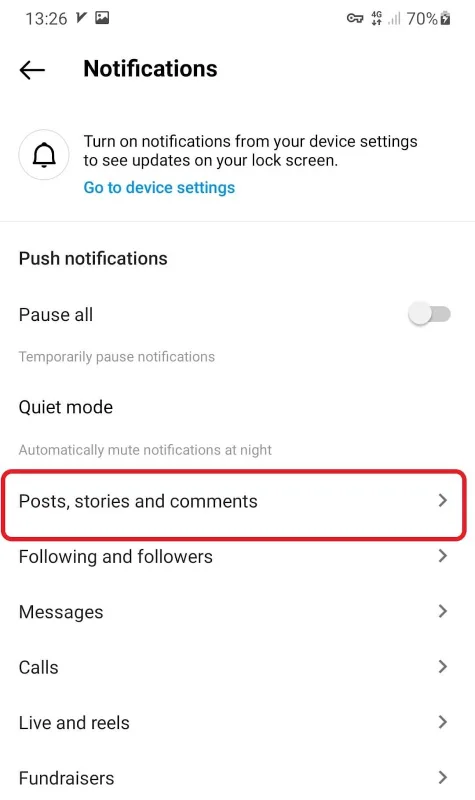
- Scroll down to “Comment likes and Pins” and switch it on. Now, you’ll get notified when someone likes your comment or pins it. To deactivate it, just turn it off.

Note: You can also see who’s liked your comment by tapping the number of likes below the comment. However, you can’t peep into other users’ comments.
How to see who liked a comment on Instagram from others?
Well, can you check who liked a comment made by someone else on Instagram? Nope, not anymore. In the past, you could do it by tapping ‘Likes,’ but Instagram decided to remove this feature. Will they bring it back? Who knows?
why can’t I see who liked a comment on Instagram anymore?
In fact, with the latest changes on Instagram in 2023, you won’t be able to see who liked a comment someone left on other people’s posts anymore. While you’ll notice the total number of likes, the list of specific users who liked it is no longer visible.
Why want to know who liked your comments on Instagram?
Ever wondered who liked your comments on Instagram? Here’s why people are curious to know:
- Getting to know who liked your comment gives a little nod of acknowledgment and validation. It’s like a digital high-five that shows your thoughts were spot-on for certain folks.
- It also opens doors to connecting with them. It’s a chance to chat and bond over common interests, almost like finding a friendly face in a big digital crowd.
- Keeping an eye on who likes your comments is like tracking engagement. It helps you see how much people dig what you’re saying and how you’re making waves in the Instagram world.
- Moreover, you’re getting feedback about what they love. This insight guides you in chatting about stuff that clicks with them, making your interactions even more awesome.
- When you figure out who’s into your content, you can find a map for your social media strategy. So, it will help you zero in on what sparks interest and steer your ship toward posts and convos that light up the engagement meter.
- But sometimes it’s just about curiosity. We’re naturally intrigued to know who’s giving our thoughts and creativity a virtual thumbs-up.
Can the likes on a comment on Instagram grow your engagement rate?
Definitely! When a comment gets likes on Instagram, it’s like a turbocharge for your engagement rate. Those likes show that people are actively involved and chatting.
This not only makes your post more attractive to the platform’s algorithms but also amps up your overall engagement stats. That means your post has better odds of reaching a wider audience.
When it comes to a strong Instagram presence, there’s always a shortcut – and that’s where AiGrow steps in. Give AiGrow a shot to prove it!
Can people see I liked their comments on Instagram?
Absolutely, people can see when you’ve liked their comments on Instagram. Your username and profile picture will appear alongside your likes, letting them know you appreciate their input.
How can I like a comment on Instagram?
To like a comment on Instagram, you just need to tap the heart icon under the comment, if you change your mind, you can unlike it by clicking the icon again.
FAQs on How to see who liked your comment on Instagram
Now that you know how to see who liked your comment on Instagram, let’s tackle some FAQs that might be buzzing around in your thoughts.
Can someone see if I liked a comment on Instagram?
Only the person whose comment you liked will know about it. For everyone else, your likes and unlikes on comments stay under the radar.
How to see your likes on Instagram?
To see your likes, simply follow these steps:
- Go to your profile and tap on the three-line icon.
- Once you open “Your Activity”, you’ll see “Likes”.

- Now, tap on “Likes” to view all the posts you’ve liked. You can even sort them by time – last year, last month, last week, or your own custom range.
How to see liked comments on Instagram?
To view all the comments you’ve left, you need to go to “Your Activity”- right below Likes, then tap Comments.
If you want to check the comment from a specific time, like August 12, 2022, to August 12, 2023, set the starting and the end date and go on.
Why can’t I like comments on Instagram?
If you can’t like a comment on Instagram, there might be some reasons at play:
- Either the person who wrote the comment or the person who shared the post deleted it.
- The person who shared the post might have turned off commenting just when you tried to like a comment.
- Poor Internet can disturb you while liking a comment.
- You’ve left too many comment likes and you’ve got action blocked by Instagram.
- Or it could be a temporary glitch that’ll sort itself up with time.
